
cancel
Showing results for 
Search instead for 
Did you mean: 

View all the Fabric Data Days sessions on demand. View schedule

Reply
usman96
Helper II
Helper II

Remaining Days of Month Calculation

tmp.PNG

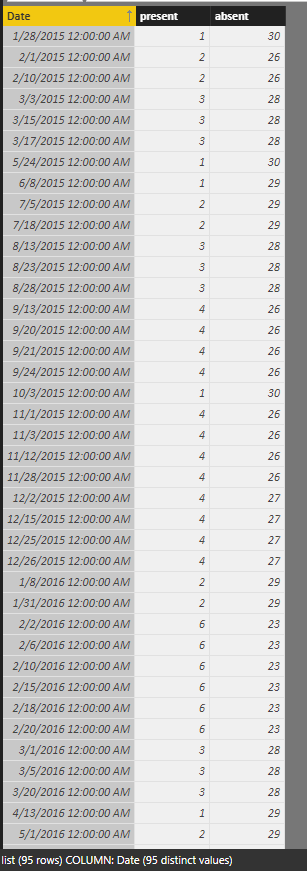
I have this column which have dates  , these dates show the day on which employees are "present"

How to calculate absent days (other days which are not in this column) ? in powerbi 


1 ACCEPTED SOLUTION
Anonymous
Not applicable

Hi @usman96,


You can use below calculate column to achieve your requirement:

present =
COUNTROWS (
    FILTER (
        ALL ( list ),
        YEAR ( [Date] ) = YEAR ( EARLIER ( list[Date] ) )
            && MONTH ( [Date] ) = MONTH ( EARLIER ( list[Date] ) )
    )
)

absent = 
DAY ( DATE ( YEAR ( [Date] ), MONTH ( [Date] ) + 1, 1 ) - 1 )
    - [present]

Result:

8.PNG


Regards,
Xiaoxin Sheng

View solution in original post

5 REPLIES 5
Anonymous
Not applicable

Hi @usman96,


You can use below calculate column to achieve your requirement:

present =
COUNTROWS (
    FILTER (
        ALL ( list ),
        YEAR ( [Date] ) = YEAR ( EARLIER ( list[Date] ) )
            && MONTH ( [Date] ) = MONTH ( EARLIER ( list[Date] ) )
    )
)

absent = 
DAY ( DATE ( YEAR ( [Date] ), MONTH ( [Date] ) + 1, 1 ) - 1 )
    - [present]

Result:

8.PNG


Regards,
Xiaoxin Sheng

Phil_Seamark
Microsoft Employee
Microsoft Employee

HI @usman96


You could join to a Date table and add two columns.  The first column showing a 1 on dates that match your list.  The second column shows a 1 on days where there is no match.


Does that sound like it might work for you?


To learn more about DAX visit : aka.ms/practicalDAX

Proud to be a Datanaut!

it would be better if could show them in bar dual bar chart 


The first bar show the present days  in number like ( 7 present days)

and the 2nd chart show the absent days  in numbers like ( 2 absent days ) 

Can you show me how to achieve this ? 

HI @usman96


Can you please mock something up (using your sample data) as I'm still not 100% clear.


I'm sure it's possible to come up with a formula, I just don't understand what you are trying to do (Sorry)


To learn more about DAX visit : aka.ms/practicalDAX

Proud to be a Datanaut!

"You could join to a Date table and add two columns.  The first column showing a 1 on dates that match your list.  The second column shows a 1 on days where there is no match."

Can you implement this and give me some sample of what you said ?

Helpful resources

Announcements
November Power BI Update Carousel

Power BI Monthly Update - November 2025

Check out the November 2025 Power BI update to learn about new features.

Fabric Data Days Carousel

Fabric Data Days

Advance your Data & AI career with 50 days of live learning, contests, hands-on challenges, study groups & certifications and more!

FabCon Atlanta 2026 carousel

FabCon Atlanta 2026

Join us at FabCon Atlanta, March 16-20, for the ultimate Fabric, Power BI, AI and SQL community-led event. Save $200 with code FABCOMM.

Top Solution Authors
Top Kudoed Authors