This time we’re going bigger than ever. Fabric, Power BI, SQL, AI and more. We're covering it all. You won't want to miss it.
Learn moreDid you hear? There's a new SQL AI Developer certification (DP-800). Start preparing now and be one of the first to get certified. Register now
Hi,
Does anyone know a way to filter a relative date using a now function or column?
I have got some DAX that counts rows, based on a Calendarauto function. The issue is that is counts for dates past today and looks pretty bad on my line graph (see below).
I have been experimenting with the Now and Today function but can't get it to show only values on or before that date.
Seeing if anyone has a solution on this 🙂
Solved! Go to Solution.
Hi,
Try this measure
=if(min(calendar[date])>today(),blank(),[your measure])
To the X-axis of your graph, please drag Date from the Calendar Table.
Hi,
Try this measure
=if(min(calendar[date])>today(),blank(),[your measure])
To the X-axis of your graph, please drag Date from the Calendar Table.
This will only bring today's data though, I still want to see back at least 3 months before today.
Hi, @Kmcdonald , here's the specific idea I mentioned before:
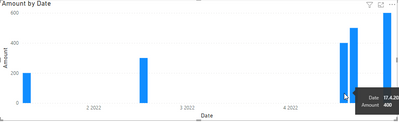
See my visual with dates that are after Today:
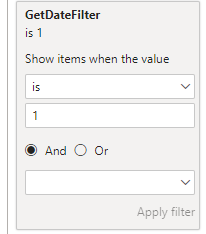
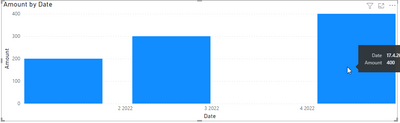
Now, write this measure, put it to the Filter Pane accordingly and you will get dates before today(including today, you can adjust that).
GetDateFilter =
IF(MAX('Date'[Date])> TODAY(), 0, 1)
Hi, @Kmcdonald
The easiest solution is to write a calculated column or measure that will check the current day and return 1 or 0 (or whatever) for days before today. Then you go to the Filter pane and put the column or measure to filter that visual and you select that you want to display only data that have the result 1.
Check out the April 2026 Power BI update to learn about new features.
Sign up to receive a private message when registration opens and key events begin.
If you have recently started exploring Fabric, we'd love to hear how it's going. Your feedback can help with product improvements.
| User | Count |
|---|---|
| 34 | |
| 31 | |
| 25 | |
| 20 | |
| 16 |
| User | Count |
|---|---|
| 60 | |
| 48 | |
| 29 | |
| 23 | |
| 23 |