Join us in Barcelona for FabCon and SQLCon, September 28 - October 1, 2026.
This is best Fabric, Power BI, SQL and AI community event. How do we know? The last event sold out! Save €200 with code FABCMTY200.
Register now- Power BI forums
- Get Help with Power BI
- Desktop
- Service
- Report Server
- Power Query
- Mobile Apps
- Developer
- DAX Commands and Tips
- Custom Visuals Development Discussion
- Health and Life Sciences
- Power BI Spanish forums
- Translated Spanish Desktop
- Training and Consulting
- Instructor Led Training
- Dashboard in a Day for Women, by Women
- Galleries
- Data Stories Gallery
- Themes Gallery
- Contests Gallery
- QuickViz Gallery
- Quick Measures Gallery
- Visual Calculations Gallery
- Notebook Gallery
- Translytical Task Flow Gallery
- TMDL Gallery
- R Script Showcase
- Webinars and Video Gallery
- Ideas
- Custom Visuals Ideas (read-only)
- Issues
- Issues
- Events
- Upcoming Events
A new Data Days event is coming soon! This time we’re going bigger than ever. Fabric, Power BI, SQL, AI and more. Don't miss out.
- Power BI forums
- Forums
- Get Help with Power BI
- Desktop
- Relationships
- Subscribe to RSS Feed
- Mark Topic as New
- Mark Topic as Read
- Float this Topic for Current User
- Bookmark
- Subscribe
- Printer Friendly Page

- Mark as New
- Bookmark
- Subscribe
- Mute
- Subscribe to RSS Feed
- Permalink
- Report Inappropriate Content
Relationships
Hello everyone.
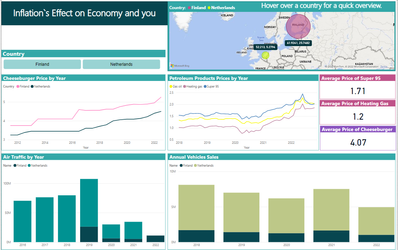
I am working on a small project using powerbi. I have 4 small tables from where I am getting data for my graphs. I created another table called Countries with the values - Netherlands and Finland. The Countries table has a relationship with the other 4 tables. However, I would like to implement a second slicer containing Year. When I try to create a relationship between my Date table with the others I am getting an error.
Can you please help me to resolve that issue or give me an alternative solution how can I apply year filter on the page.
Solved! Go to Solution.


- Mark as New
- Bookmark
- Subscribe
- Mute
- Subscribe to RSS Feed
- Permalink
- Report Inappropriate Content
Right, so there's the evidence. All the relationships are 'both' directions.
See my previous answer.
- Mark as New
- Bookmark
- Subscribe
- Mute
- Subscribe to RSS Feed
- Permalink
- Report Inappropriate Content
Right, so there's the evidence. All the relationships are 'both' directions.
See my previous answer.
- Mark as New
- Bookmark
- Subscribe
- Mute
- Subscribe to RSS Feed
- Permalink
- Report Inappropriate Content
The error is 'ambiguity between Date and Countries' so that means there would be 2 paths for powerbi to traverse between these 2 tables. This is not allowed.
I can't suggest any complete fixes without seeing the diagram but it does suggest you don't have a star schema with dimension tables filtering fact tables.
- Mark as New
- Bookmark
- Subscribe
- Mute
- Subscribe to RSS Feed
- Permalink
- Report Inappropriate Content
Here is a photo of the diagram.



- Mark as New
- Bookmark
- Subscribe
- Mute
- Subscribe to RSS Feed
- Permalink
- Report Inappropriate Content
Hi, @Anonymous
According to your description, "When I try to create a relationship between my Date table with the others I am getting an error.". Right?
There are several possible situations for your problem that you need to check:
(1)First of all, whether your Date Table is a compliant date table and whether it was generated using the CALENDAR() function.
(2)Whether the relationship is related using the [Date] field in the date table when creating the relationship.
(3)Check whether the associated date fields are all of type Date type.
If none of the above is satisfied, you can provide the following error message, or provide us with your .pbix file (delete sensitive data).
Thank you for your time and sharing, and thank you for your support and understanding of PowerBI!
Best Regards,
Aniya Zhang
If this post helps, then please consider Accept it as the solution to help the other members find it more quickly
- Mark as New
- Bookmark
- Subscribe
- Mute
- Subscribe to RSS Feed
- Permalink
- Report Inappropriate Content
Sent you a private message.
- Mark as New
- Bookmark
- Subscribe
- Mute
- Subscribe to RSS Feed
- Permalink
- Report Inappropriate Content
"When I try to create a relationship between my Date table with the others I am getting an error." - what's the error?
and can you show us the model diagram please
- Mark as New
- Bookmark
- Subscribe
- Mute
- Subscribe to RSS Feed
- Permalink
- Report Inappropriate Content
Sent you a private message explaining the issue.
Helpful resources

Power BI Monthly Update - May 2026
Check out the May 2026 Power BI update to learn about new features.

Data Days 2026 coming soon!
Sign up to receive a private message when registration opens and key events begin.

New to Fabric Survey
If you have recently started exploring Fabric, we'd love to hear how it's going. Your feedback can help with product improvements.

Power BI DataViz World Championships - June 2026
A new Power BI DataViz World Championship is coming this June! Don't miss out on submitting your entry.

| User | Count |
|---|---|
| 27 | |
| 25 | |
| 23 | |
| 19 | |
| 14 |


| User | Count |
|---|---|
| 50 | |
| 45 | |
| 20 | |
| 18 | |
| 18 |


