Join us at FabCon Atlanta from March 16 - 20, 2026, for the ultimate Fabric, Power BI, AI and SQL community-led event. Save $200 with code FABCOMM.
Register now!The Power BI Data Visualization World Championships is back! Get ahead of the game and start preparing now! Learn more
Hi Power BI Community,
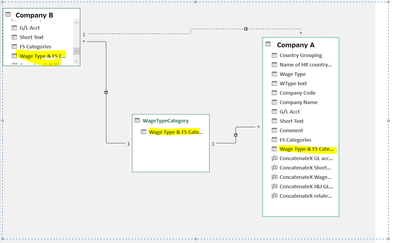
I have a following data model where I have two chart of accounts of different companies mapped by connecting key. I'd like to see the G/L Account of Company A side by side by GL account of Company B even though they have nothing in common except for that connecting key. Due to the relationship key is the yellow highlighted field, I connot apply the filter to company A's from the GL information of Company B. Please could you let me know what I should do in this situation? I tried relatedtable function, calculalte and crossfilter between Company A and Company B's inactive relationship, but I cannot properly filter the GL account information of Company A from Company B's GL and vice versa. Thank you for your help.
Solved! Go to Solution.
Hi @DataNinja777,
You cannot use an inactive relationship to filter table A from a column in table B like you can with an active relationship. You need to use USERELATIONSHIP to invoke such a relationship in a measure and put that measure in your visual.
=
CALCULATE (
SUM ( tableB[Column] ),
USERELATIONSHIP ( tableA[key], tableB[key] )
)
But I'm curious, since you have a related table in between thet two fact tables, why not use that instead?
Thanks you @danextian
The combination of calculate, userelationship, and crossfilter produced the output I was after 😉
Hi @DataNinja777,
You cannot use an inactive relationship to filter table A from a column in table B like you can with an active relationship. You need to use USERELATIONSHIP to invoke such a relationship in a measure and put that measure in your visual.
=
CALCULATE (
SUM ( tableB[Column] ),
USERELATIONSHIP ( tableA[key], tableB[key] )
)
But I'm curious, since you have a related table in between thet two fact tables, why not use that instead?
The Power BI Data Visualization World Championships is back! Get ahead of the game and start preparing now!
| User | Count |
|---|---|
| 39 | |
| 37 | |
| 33 | |
| 32 | |
| 29 |
| User | Count |
|---|---|
| 133 | |
| 88 | |
| 85 | |
| 68 | |
| 64 |