Get Fabric or SQL Certified for Free.
Get certified for free when you join Fabric Data Days 2026 and dive into Fabric, Power BI, SQL, AI, and other essential data skills.
Join now- Power BI forums
- Get Help with Power BI
- Desktop
- Service
- Report Server
- Power Query
- Mobile Apps
- Developer
- DAX Commands and Tips
- Custom Visuals Development Discussion
- Health and Life Sciences
- Power BI Spanish forums
- Translated Spanish Desktop
- Training and Consulting
- Instructor Led Training
- Dashboard in a Day for Women, by Women
- Galleries
- Data Stories Gallery
- Themes Gallery
- Contests Gallery
- QuickViz Gallery
- Quick Measures Gallery
- Visual Calculations Gallery
- Notebook Gallery
- Translytical Task Flow Gallery
- TMDL Gallery
- R Script Showcase
- Webinars and Video Gallery
- Ideas
- Custom Visuals Ideas (read-only)
- Issues
- Issues
- Events
- Upcoming Events
Try your skills in the Power BI Dataviz World Championship! Round one ends June 26. Join now
- Power BI forums
- Forums
- Get Help with Power BI
- Desktop
- Re: Relationship issue between date fields
- Subscribe to RSS Feed
- Mark Topic as New
- Mark Topic as Read
- Float this Topic for Current User
- Bookmark
- Subscribe
- Printer Friendly Page


- Mark as New
- Bookmark
- Subscribe
- Mute
- Subscribe to RSS Feed
- Permalink
- Report Inappropriate Content
Relationship issue between date fields
I hope someone can help
I have created a relationship between a date table and a database. The link is between "date" (from date table) and "date closed" (fromthe database)
The aim is to have a card which counts the amount of lines in the database based on how many have been closed in a selectable date range. However when I make this the card returns "(blank)".
Both columns are in date format, if I use the date closed as a filter and turn off the relationship it works, I have 4 other tables which all have relationships to date closed without any issues
Any help with why this relationship might not be working would be greatly appreciated
Thanks
Matt
Solved! Go to Solution.
- Mark as New
- Bookmark
- Subscribe
- Mute
- Subscribe to RSS Feed
- Permalink
- Report Inappropriate Content
Hi
Thanks for your support
The reason it was only matching 11 entries was due to the Database table "Date Closed" being retrieved in Date/Time format. Once I edited this it all worked.
Thank you for your time helping on this
Matt

- Mark as New
- Bookmark
- Subscribe
- Mute
- Subscribe to RSS Feed
- Permalink
- Report Inappropriate Content
Hi,
In the Edit Query Use the Merge Option and select left join Option between"Date" table and "Data Base" table. So it will filter the data from "Database" table based on "Date" table .


- Mark as New
- Bookmark
- Subscribe
- Mute
- Subscribe to RSS Feed
- Permalink
- Report Inappropriate Content
Hi @Matt22365 ,
If it returns "blank",it means that there's an error in your relationship. So,do you wanna keep the relaitionship?If yes,you can make the relationship inactive(shown as below),otherwise,you can directly delete the relationship.
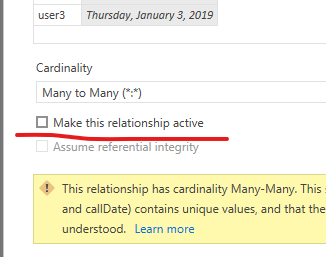
If above cant solve your problem, can you share the picture of your relationship schema if there isnt any confidential
information inside?
Best Regards,
Kelly
- Mark as New
- Bookmark
- Subscribe
- Mute
- Subscribe to RSS Feed
- Permalink
- Report Inappropriate Content
Hi
Thanks for getting back to me
I have attached a pictue of my relationships (its a little complex as I link between a lot of tables). The only issue I am having is the highlighted blue line. I want the "Date" Table to filter the "Database" table then a card to count the amount of lines where the date closed matches the filter. e.g. in 2019, how many lines of the database have been closed
Thanks
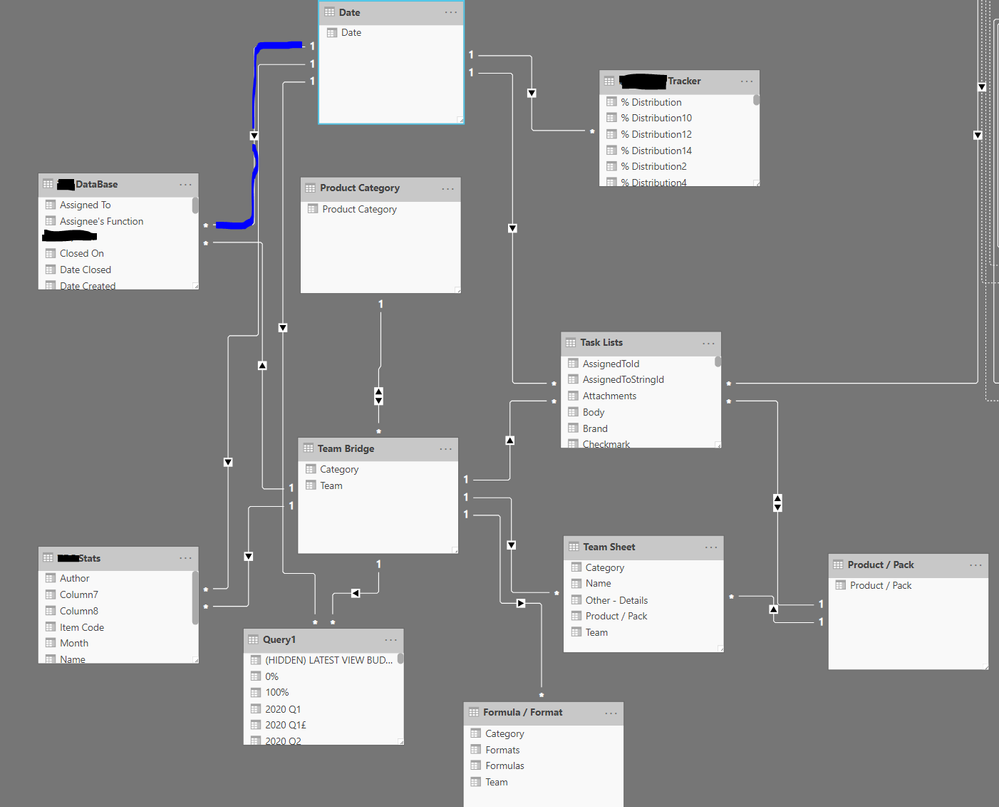
Matt
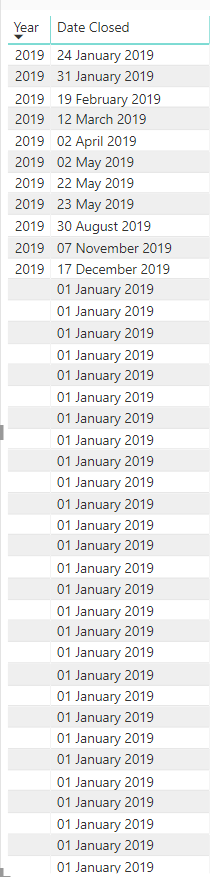
Edit - to add a bit more information, if I make a table with both date fields in some dates to match up but not all, see picture below


- Mark as New
- Bookmark
- Subscribe
- Mute
- Subscribe to RSS Feed
- Permalink
- Report Inappropriate Content
Refer my blog, how to handle two dates using same time dimension
HR-Analytics-Active-Employee-Hire-and-Termination-trend
Appreciate your Kudos. In case, this is the solution you are looking for, mark it as the Solution. In case it does not help, please provide additional information and mark me with @
Thanks. My Recent Blog -
Winner-Topper-on-Map-How-to-Color-States-on-a-Map-with-Winners , HR-Analytics-Active-Employee-Hire-and-Termination-trend
Power-BI-Working-with-Non-Standard-Time-Periods And Comparing-Data-Across-Date-Ranges
Connect on Linkedin
- Mark as New
- Bookmark
- Subscribe
- Mute
- Subscribe to RSS Feed
- Permalink
- Report Inappropriate Content
Morning
Thanks for getting back to me, I have used your article for a different issue but I think this requires a more simple fix
I have attached a pictue of my relationships (its a little complex as I link between a lot of tables). The only issue I am having is the highlighted blue line. I want the "Date" Table to filter the "Database" table then a card to count the amount of lines where the date closed matches the filter. e.g. in 2019, how many lines of the database have been closed
Thanks
Matt
Edit - to add a bit more information, if I make a table with both date fields in some dates to match up but not all, see picture below
- Mark as New
- Bookmark
- Subscribe
- Mute
- Subscribe to RSS Feed
- Permalink
- Report Inappropriate Content
Hi @Matt22365 ,
Just now I used my sample data to test on your provided relationship schema,but I cant find what your problem is,as everything runs fine in here:
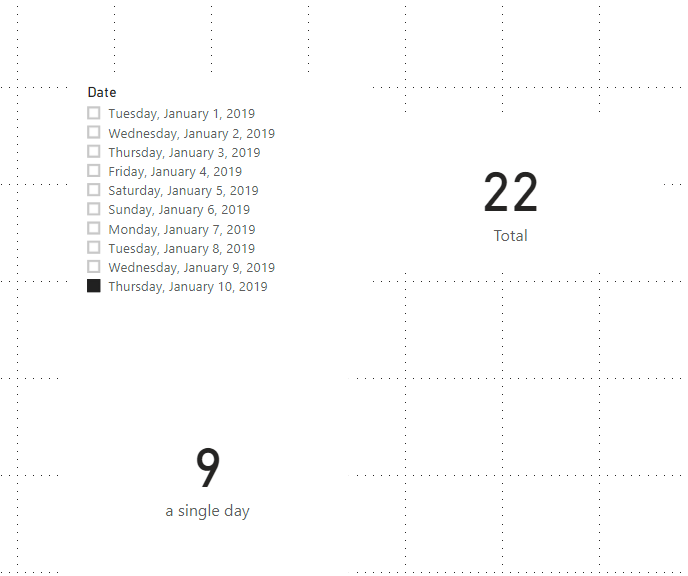

So now pls advise me what the measure you are using?And in the table "Database",which column are you filtering with?
For my .pbix file, pls click here.
Best Regards,
Kelly
- Mark as New
- Bookmark
- Subscribe
- Mute
- Subscribe to RSS Feed
- Permalink
- Report Inappropriate Content
Hi
Thanks for getting back to me
I have created a link between "Date" and "Date Closed".
I havent created a measure for this calculation as the relationship between the Date and Stats tables is working correctly (without one) i.e. a card to count the amount of line where the published date meets the criteria of a sliced based on the Date column
It appears that the link is working as 11 of the 2019 rows are counted using the date table filter (you can see these in the previously uploaded picture), however this number should be in the thousands
Thanks
Matt
- Mark as New
- Bookmark
- Subscribe
- Mute
- Subscribe to RSS Feed
- Permalink
- Report Inappropriate Content
Hi @Matt22365 ,
So how do you make it appear in the table for the 11 lines?As in my table ,I use a calculated column to link the 2 tables,and everything runs ok,as you can see below:
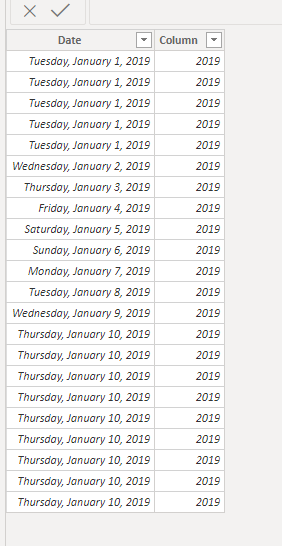
So let me know more details,I will try my best to find out the problem.
Best Regards,
Kelly
- Mark as New
- Bookmark
- Subscribe
- Mute
- Subscribe to RSS Feed
- Permalink
- Report Inappropriate Content
Hi
Thanks for your support
The reason it was only matching 11 entries was due to the Database table "Date Closed" being retrieved in Date/Time format. Once I edited this it all worked.
Thank you for your time helping on this
Matt


- Mark as New
- Bookmark
- Subscribe
- Mute
- Subscribe to RSS Feed
- Permalink
- Report Inappropriate Content
Can you share picture of your relationship schema please and thanks
- Mark as New
- Bookmark
- Subscribe
- Mute
- Subscribe to RSS Feed
- Permalink
- Report Inappropriate Content
Hi
Thanks for getting back to me I have attached a pictue of my relationships to one of the other comments
The only issue I am having is the highlighted blue line. I want the "Date" Table to filter the "Database" table then a card to count the amount of lines where the date closed matches the filter. e.g. in 2019, how many lines of the database have been closed
Thanks
Matt
Helpful resources

Data Days 2026
Don't miss out on Data Days, June 15 through August 7. Learn Fabric, Power BI, SQL, AI and more.

Power BI DataViz World Championships - June 2026
A new Power BI DataViz World Championship is coming this June! Don't miss out on submitting your entry.

| User | Count |
|---|---|
| 22 | |
| 22 | |
| 20 | |
| 19 | |
| 11 |


| User | Count |
|---|---|
| 66 | |
| 56 | |
| 46 | |
| 44 | |
| 31 |


