cancel
Showing results for 
Search instead for 
Did you mean: 

Try your skills in the Power BI Dataviz World Championship! Round one ends June 26. Join now

Reply
prateeks
Frequent Visitor

Relationship between dimension fields

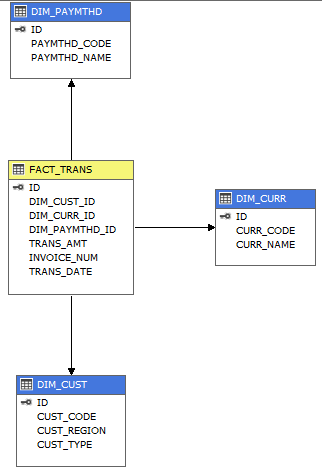
Hi, I have a very simple dimenion model and ssas cube as below.

Now when I connect to cube using PBI desktop, I want to create a simple bar chart showing number of customers in each region.

Basically count of CUST_CODE in each CUST_REGION. But I am not able to do it because PBI doesn't allow me to drag CUST_CODE to value. 


When I just connect to the database directly to the tables and try to do the same thing, it works.

How to do it in the cube? 


CUBEDWH.PNG


1 ACCEPTED SOLUTION
Anonymous
Not applicable

@prateeks

I make a test with a table visual. It is possible to create a table visual using the dimension fields you mention. It is impossible to drag them to Values section of other charts in Live mode.

Regards,
Lydia

View solution in original post

5 REPLIES 5
Anonymous
Not applicable

@prateeks,

What error message do you get in Power BI Desktop? What mode do you choose to import data from SSAS cube to Power BI Desktop, import or connect live?

Do you establish 1:many relationship between DIM_CURR and FACT_TRANS table , and establish 1:many relationship between DIM_CUSY and FACT_TRANS table? If so, make sure the filter direction is set to Bi directional.

Regards,
Lydia

Hi Lydia,


- There is no error message, only PBI only doesn't allow to drop the field into "Values".

- I am using connect live.

- Yes the relationship between DIM & FACT is 1:many

- I am using SSAS Multidimensional model, so cannot set the bi-directional filters.


Do I need to use tabular mode?

Anonymous
Not applicable

@prateeks,

I am unable to reproduce this issue when connecting to SSAS Multidimensional model with Connect Live mode. I suspect the issue is related to the relationship you create between dimension and fact tables. Please check the relationship in SSAS side.

Regards,
Lydia

Hi Lydia,


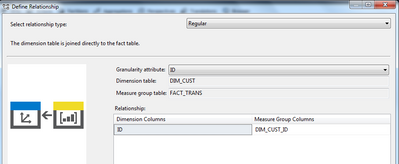
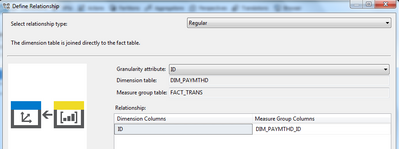
Its very straight forward relationship between DIM & FACT.

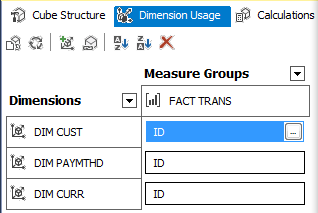
DIM is directly linked to FACT. Please see below details - 

Capture1.PNGCapture2.PNGCapture3.PNGCapture4.PNG


Anonymous
Not applicable

@prateeks

I make a test with a table visual. It is possible to create a table visual using the dimension fields you mention. It is impossible to drag them to Values section of other charts in Live mode.

Regards,
Lydia

Helpful resources

Announcements
Fabric Data Days is here Carousel

Fabric Data Days 2026

Don't miss out on Data Days, June 15 through August 7. Learn Fabric, Power BI, SQL, AI and more.

May Power BI Update Carousel

Power BI Monthly Update - May 2026

Check out the May 2026 Power BI update to learn about new features.

Power BI DataViz World Championships carousel

Power BI DataViz World Championships - June 2026

A new Power BI DataViz World Championship is coming this June! Don't miss out on submitting your entry.