This time we’re going bigger than ever. Fabric, Power BI, SQL, AI and more. We're covering it all. You won't want to miss it.
Learn moreLevel up your Power BI skills this month - build one visual each week and tell better stories with data! Get started
Hi there
I have the following two tables, with an intermediary table that I created to get a relationship between them:
Table 1:
| Name | EventDate | TimeInSeconds |
| Doe, John | 2017/04/17 00:00:00 | 43200 |
Table 2:
| ResourceID | ProjectDate | Hours |
| JDoe | 2021/05/12 00:00:00 | 8 |
Table 3 (intermediary):
| Name | ResourceID |
| Doe, John | JDoe |
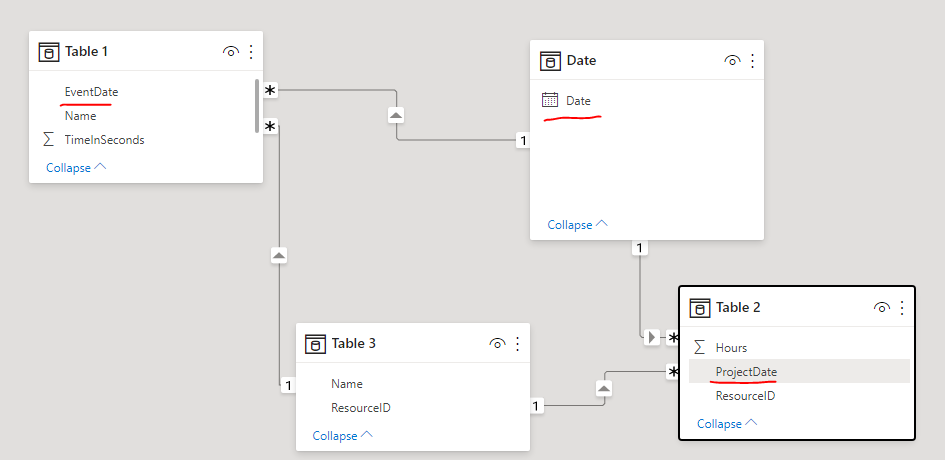
I've got a One-To-Many relationship between Table 2 and 3 (Matched on resource ID, one entry in Table 3, many in Table 2), and I've got a Many-To-Many relationship between Table 1 and Table 3 on Name.
I want to compare the TimeInSeconds column for a specific date to the Hours column for the same date (EventDate and ProjectDate respectively). When I just do the Name + ResourceID relationships and I try put everything in a table visual, EventDate and ProjectDate don't match up. When I create a relationship between EventDate and ProjectDate, EventDate stops reflecting as a date (though it's data type is datetime), and they still don't match.
How can I get this data to a place where I can use both TimeInSeconds (Table 1) and Hours (Table 2) in the same Dax formula?
Solved! Go to Solution.
Hi @cverster ,
I created a sample pbix file (see attachment) for you, please check whether that is what you want.
1. Create a date dimension table
2. Create relationships among date table(Date field), Table 1(Event Date field) and Table 2(Project Date field)
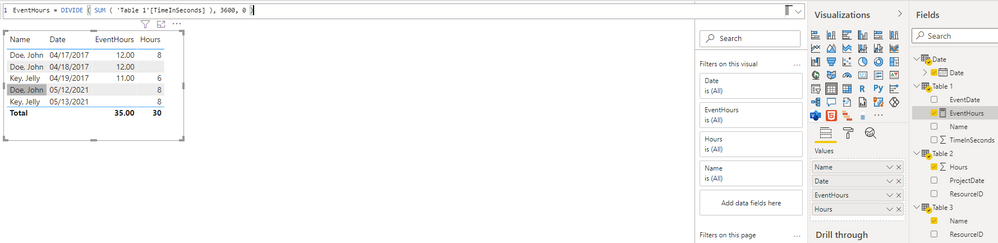
3. Create a measure to get the time of Events in hours, it will be convenient for comparison with project hours
EventHours = DIVIDE ( SUM ( 'Table 1'[TimeInSeconds] ), 3600, 0 )
Best Regards
Hi @cverster ,
I created a sample pbix file (see attachment) for you, please check whether that is what you want.
1. Create a date dimension table
2. Create relationships among date table(Date field), Table 1(Event Date field) and Table 2(Project Date field)
3. Create a measure to get the time of Events in hours, it will be convenient for comparison with project hours
EventHours = DIVIDE ( SUM ( 'Table 1'[TimeInSeconds] ), 3600, 0 )
Best Regards
Thanks for this, the intermediate date table is what I needed!
Check out the April 2026 Power BI update to learn about new features.
Sign up to receive a private message when registration opens and key events begin.
If you have recently started exploring Fabric, we'd love to hear how it's going. Your feedback can help with product improvements.
| User | Count |
|---|---|
| 36 | |
| 28 | |
| 28 | |
| 20 | |
| 18 |
| User | Count |
|---|---|
| 65 | |
| 35 | |
| 33 | |
| 25 | |
| 24 |