Don't miss your chance to take the Fabric Data Engineer (DP-600) exam for FREE! Find out how by attending the DP-600 session on April 23rd (pacific time), live or on-demand.
Learn moreNext up in the FabCon + SQLCon recap series: The roadmap for Microsoft SQL and Maximizing Developer experiences in Fabric. All sessions are available on-demand after the live show. Register now
Hi there
I have the following two tables, with an intermediary table that I created to get a relationship between them:
Table 1:
| Name | EventDate | TimeInSeconds |
| Doe, John | 2017/04/17 00:00:00 | 43200 |
Table 2:
| ResourceID | ProjectDate | Hours |
| JDoe | 2021/05/12 00:00:00 | 8 |
Table 3 (intermediary):
| Name | ResourceID |
| Doe, John | JDoe |
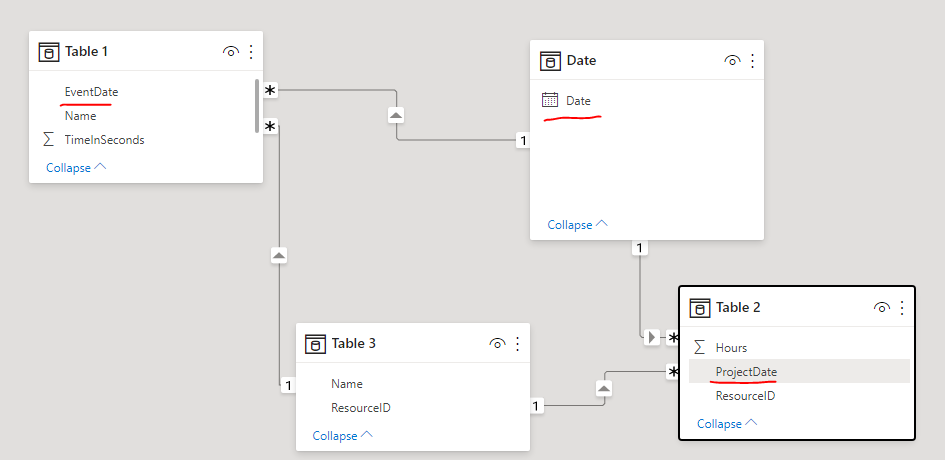
I've got a One-To-Many relationship between Table 2 and 3 (Matched on resource ID, one entry in Table 3, many in Table 2), and I've got a Many-To-Many relationship between Table 1 and Table 3 on Name.
I want to compare the TimeInSeconds column for a specific date to the Hours column for the same date (EventDate and ProjectDate respectively). When I just do the Name + ResourceID relationships and I try put everything in a table visual, EventDate and ProjectDate don't match up. When I create a relationship between EventDate and ProjectDate, EventDate stops reflecting as a date (though it's data type is datetime), and they still don't match.
How can I get this data to a place where I can use both TimeInSeconds (Table 1) and Hours (Table 2) in the same Dax formula?
Solved! Go to Solution.
Hi @cverster ,
I created a sample pbix file (see attachment) for you, please check whether that is what you want.
1. Create a date dimension table
2. Create relationships among date table(Date field), Table 1(Event Date field) and Table 2(Project Date field)
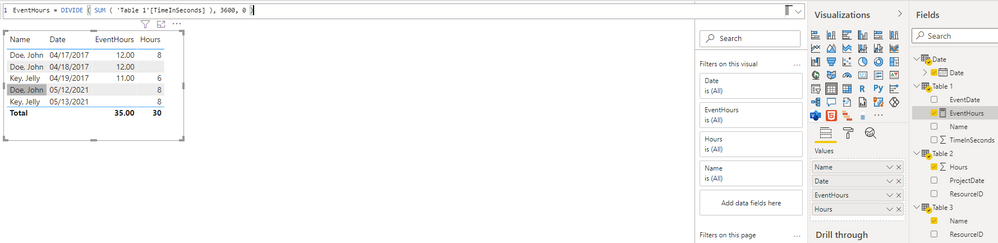
3. Create a measure to get the time of Events in hours, it will be convenient for comparison with project hours
EventHours = DIVIDE ( SUM ( 'Table 1'[TimeInSeconds] ), 3600, 0 )
Best Regards
Hi @cverster ,
I created a sample pbix file (see attachment) for you, please check whether that is what you want.
1. Create a date dimension table
2. Create relationships among date table(Date field), Table 1(Event Date field) and Table 2(Project Date field)
3. Create a measure to get the time of Events in hours, it will be convenient for comparison with project hours
EventHours = DIVIDE ( SUM ( 'Table 1'[TimeInSeconds] ), 3600, 0 )
Best Regards
Thanks for this, the intermediate date table is what I needed!
If you have recently started exploring Fabric, we'd love to hear how it's going. Your feedback can help with product improvements.
A new Power BI DataViz World Championship is coming this June! Don't miss out on submitting your entry.
| User | Count |
|---|---|
| 46 | |
| 43 | |
| 39 | |
| 19 | |
| 15 |
| User | Count |
|---|---|
| 68 | |
| 65 | |
| 31 | |
| 28 | |
| 24 |