Join us at FabCon Atlanta from March 16 - 20, 2026, for the ultimate Fabric, Power BI, AI and SQL community-led event. Save $200 with code FABCOMM.
Register now!The Power BI Data Visualization World Championships is back! Get ahead of the game and start preparing now! Learn more
Hi All,
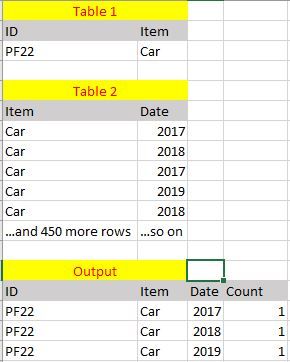
Here I've attached the sample of filtered information of the two tables and the output is the one that I got in PowerBI summary table. A many-to-many relationship was established between table 1 and table 2 as it was the only choice that PowerBI allowed. It was established between 'Item' on both tables.
I would like to know why am i getting such an output and what can be done to solve it.
(The count value is not set to distinct)
Thank you in advance.
Hi @Anonymous ,
Actually, if the ID and Item in table is mapped one-to-one correspondence, it should be a one to many relationship, if they are not mapped one-to-one, one item has many ID mapped, then we cannot get the sum of ID in the result table, we will need to add the column ID to the table 2.
Best Regards,
Teige
The Power BI Data Visualization World Championships is back! Get ahead of the game and start preparing now!
| User | Count |
|---|---|
| 38 | |
| 36 | |
| 33 | |
| 33 | |
| 29 |
| User | Count |
|---|---|
| 134 | |
| 96 | |
| 78 | |
| 67 | |
| 65 |