cancel
Showing results for 
Search instead for 
Did you mean: 

Get Fabric certified for FREE! Don't miss your chance! Learn more

Reply
Anonymous
Not applicable

Relationship Issue

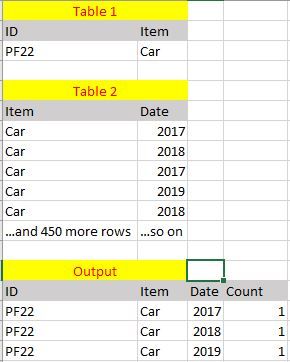
PowerBI.JPGHi All,


Here I've attached the sample of filtered information of the two tables and the output is the one that I got in PowerBI summary table. A many-to-many relationship was established between table 1 and table 2 as it was the only choice that PowerBI allowed. It was established between 'Item' on both tables.


I would like to know why am i getting such an output and what can be done to solve it. 


(The count value is not set to distinct)


Thank you in advance.

1 REPLY 1
TeigeGao
Solution Sage
Solution Sage

Hi @Anonymous ,

Actually, if the ID and Item in table is mapped one-to-one correspondence, it should be a one to many relationship, if they are not mapped one-to-one, one item has many ID mapped, then we cannot get the sum of ID in the result table, we will need to add the column ID to the table 2.

Best Regards,

Teige

Helpful resources

Announcements
Join our Fabric User Panel

Join our Fabric User Panel

Share feedback directly with Fabric product managers, participate in targeted research studies and influence the Fabric roadmap.

FabCon Atlanta 2026 carousel

FabCon Atlanta 2026

Join us at FabCon Atlanta, March 16-20, for the ultimate Fabric, Power BI, AI and SQL community-led event. Save $200 with code FABCOMM.