
Don't miss your chance to take the Fabric Data Engineer (DP-600) exam for FREE! Find out how by attending the DP-600 session on April 23rd (pacific time), live or on-demand.
Learn moreNext up in the FabCon + SQLCon recap series: The roadmap for Microsoft SQL and Maximizing Developer experiences in Fabric. All sessions are available on-demand after the live show. Register now
I ran an import query against an sql server on power bi desktop and then uploaded the file on to powerbi service. I've set up the gateway and want the data to refresh when I click refresh but it does not update with the latest data from the query. I am not sure if the query was actually uploaded or just the data from my query when I put on power bi service. How can i configure power bi service to run the query when I click refresh?
Solved! Go to Solution.
Hi, @Anonymous
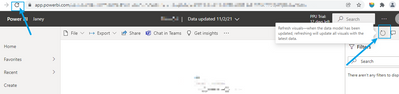
If you configure the gateway correctly, you can click the two buttons to refresh. You can see the refresh history in dataset>>more options>>setting>>refresh history.
If you have opened the report, you can refresh to get the latest data through the refresh button on the browser and the refresh button on the report (Make sure that the dataset has been refreshed at this time).
Here you can view the latest update time of the report:
@Anonymous Sounds like you are hitting the refresh button in the Service on the report page. That simply refreshes the report visuals, it doesn't actually refresh the data. You need to schedule a refresh on the dataset.
Never mind it is refreshing the data but the report is just not reflecting it. Do you know how I can update the report? I don't see a refresh option on it.
Hi, @Anonymous
If you configure the gateway correctly, you can click the two buttons to refresh. You can see the refresh history in dataset>>more options>>setting>>refresh history.
If you have opened the report, you can refresh to get the latest data through the refresh button on the browser and the refresh button on the report (Make sure that the dataset has been refreshed at this time).
Here you can view the latest update time of the report:
If you have recently started exploring Fabric, we'd love to hear how it's going. Your feedback can help with product improvements.
A new Power BI DataViz World Championship is coming this June! Don't miss out on submitting your entry.
Share feedback directly with Fabric product managers, participate in targeted research studies and influence the Fabric roadmap.
| User | Count |
|---|---|
| 48 | |
| 45 | |
| 41 | |
| 20 | |
| 18 |
| User | Count |
|---|---|
| 69 | |
| 64 | |
| 32 | |
| 31 | |
| 27 |