
This time we’re going bigger than ever. Fabric, Power BI, SQL, AI and more. We're covering it all. You won't want to miss it.
Learn moreLevel up your Power BI skills this month - build one visual each week and tell better stories with data! Get started
I ran an import query against an sql server on power bi desktop and then uploaded the file on to powerbi service. I've set up the gateway and want the data to refresh when I click refresh but it does not update with the latest data from the query. I am not sure if the query was actually uploaded or just the data from my query when I put on power bi service. How can i configure power bi service to run the query when I click refresh?
Solved! Go to Solution.
Hi, @Anonymous
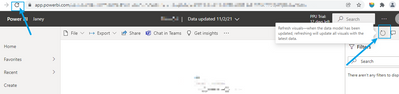
If you configure the gateway correctly, you can click the two buttons to refresh. You can see the refresh history in dataset>>more options>>setting>>refresh history.
If you have opened the report, you can refresh to get the latest data through the refresh button on the browser and the refresh button on the report (Make sure that the dataset has been refreshed at this time).
Here you can view the latest update time of the report:
@Anonymous Sounds like you are hitting the refresh button in the Service on the report page. That simply refreshes the report visuals, it doesn't actually refresh the data. You need to schedule a refresh on the dataset.
Never mind it is refreshing the data but the report is just not reflecting it. Do you know how I can update the report? I don't see a refresh option on it.
Hi, @Anonymous
If you configure the gateway correctly, you can click the two buttons to refresh. You can see the refresh history in dataset>>more options>>setting>>refresh history.
If you have opened the report, you can refresh to get the latest data through the refresh button on the browser and the refresh button on the report (Make sure that the dataset has been refreshed at this time).
Here you can view the latest update time of the report:
Check out the April 2026 Power BI update to learn about new features.
Sign up to receive a private message when registration opens and key events begin.
If you have recently started exploring Fabric, we'd love to hear how it's going. Your feedback can help with product improvements.
| User | Count |
|---|---|
| 28 | |
| 23 | |
| 22 | |
| 16 | |
| 16 |
| User | Count |
|---|---|
| 61 | |
| 35 | |
| 29 | |
| 23 | |
| 22 |