Don't miss your chance to take the Fabric Data Engineer (DP-600) exam for FREE! Find out how by attending the DP-600 session on April 23rd (pacific time), live or on-demand.
Learn moreNext up in the FabCon + SQLCon recap series: The roadmap for Microsoft SQL and Maximizing Developer experiences in Fabric. All sessions are available on-demand after the live show. Register now
Hello All,
I can refresh the Data from SQL Table Function with Date parameters through "Power Query Editor" by providing new Date Value.
But I want end users to refresh the data from same SQL Table Function through "Field Panel".
Is it possible as I cannot figure it out?
Thanks in advance.
Maw Maw
@mawmawoo , field panel means report?
refer
https://www.biinsight.com/power-bi-desktop-query-parameters-part-1/
Hello Amitchandak,
Yes, want to see it in field panel of report.
Thanks for the Parameter Value related information.
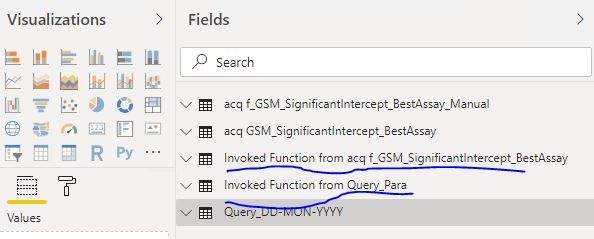
I managed to setup Date parameters to run the Table-valued Function in Power Query Editor environment. It will generate "Invoke Function xxxxxx" as below.
But in the "Report Environment" it will only show the "Invoke Function xxxxx", not actual function for user to select NEW DATES to refresh the data. I want user to select date from parameters ro generate new set of data.
Cheers,
Maw Maw
If you have recently started exploring Fabric, we'd love to hear how it's going. Your feedback can help with product improvements.
A new Power BI DataViz World Championship is coming this June! Don't miss out on submitting your entry.
Share feedback directly with Fabric product managers, participate in targeted research studies and influence the Fabric roadmap.
| User | Count |
|---|---|
| 48 | |
| 45 | |
| 41 | |
| 20 | |
| 17 |
| User | Count |
|---|---|
| 69 | |
| 63 | |
| 32 | |
| 31 | |
| 23 |