This time we’re going bigger than ever. Fabric, Power BI, SQL, AI and more. We're covering it all. You won't want to miss it.
Learn moreDid you hear? There's a new SQL AI Developer certification (DP-800). Start preparing now and be one of the first to get certified. Register now
Hello All,
I can refresh the Data from SQL Table Function with Date parameters through "Power Query Editor" by providing new Date Value.
But I want end users to refresh the data from same SQL Table Function through "Field Panel".
Is it possible as I cannot figure it out?
Thanks in advance.
Maw Maw
@mawmawoo , field panel means report?
refer
https://www.biinsight.com/power-bi-desktop-query-parameters-part-1/
Hello Amitchandak,
Yes, want to see it in field panel of report.
Thanks for the Parameter Value related information.
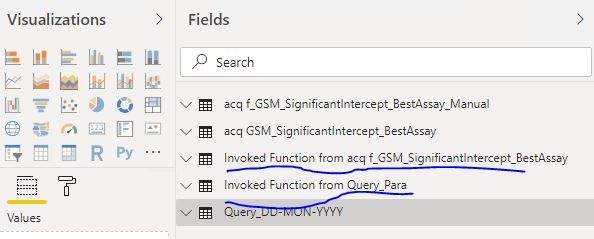
I managed to setup Date parameters to run the Table-valued Function in Power Query Editor environment. It will generate "Invoke Function xxxxxx" as below.
But in the "Report Environment" it will only show the "Invoke Function xxxxx", not actual function for user to select NEW DATES to refresh the data. I want user to select date from parameters ro generate new set of data.
Cheers,
Maw Maw
Check out the April 2026 Power BI update to learn about new features.
If you have recently started exploring Fabric, we'd love to hear how it's going. Your feedback can help with product improvements.
A new Power BI DataViz World Championship is coming this June! Don't miss out on submitting your entry.
| User | Count |
|---|---|
| 38 | |
| 38 | |
| 31 | |
| 22 | |
| 15 |
| User | Count |
|---|---|
| 74 | |
| 61 | |
| 31 | |
| 31 | |
| 23 |