This is best Fabric, Power BI, SQL and AI community event. How do we know? The last event sold out! Save €200 with code FABCMTY200.
Register nowA new Data Days event is coming soon! This time we’re going bigger than ever. Fabric, Power BI, SQL, AI and more. Don't miss out.
Hi,
since yesterday when i refresh pbi desktop file. it never fininshed ..?
i am seeing this message for 20 mins now. normally it takes less 1 mins.
do you have any clue?
@Anonymous is your data source available? Maybe there is a lag to pull the data? What is your source?
Ask anything Power BI. Book appointment for a free consultancy at https://www.perytus.com
Subscribe to the @PowerBIHowTo YT channel for an upcoming video on List and Record functions in Power Query!!
Learn Power BI and Fabric - subscribe to our YT channel - Click here: @PowerBIHowTo
If my solution proved useful, I'd be delighted to receive Kudos. When you put effort into asking a question, it's equally thoughtful to acknowledge and give Kudos to the individual who helped you solve the problem. It's a small gesture that shows appreciation and encouragement! ❤
Did I answer your question? Mark my post as a solution. Proud to be a Super User! Appreciate your Kudos 🙂
Feel free to email me with any of your BI needs.
The source is Excel file and its pretty small size one..!
i don't understand what the problem is....
@Anonymous that's surely weird, can you check in query editor if you can preview the file.
Subscribe to the @PowerBIHowTo YT channel for an upcoming video on List and Record functions in Power Query!!
Learn Power BI and Fabric - subscribe to our YT channel - Click here: @PowerBIHowTo
If my solution proved useful, I'd be delighted to receive Kudos. When you put effort into asking a question, it's equally thoughtful to acknowledge and give Kudos to the individual who helped you solve the problem. It's a small gesture that shows appreciation and encouragement! ❤
Did I answer your question? Mark my post as a solution. Proud to be a Super User! Appreciate your Kudos 🙂
Feel free to email me with any of your BI needs.
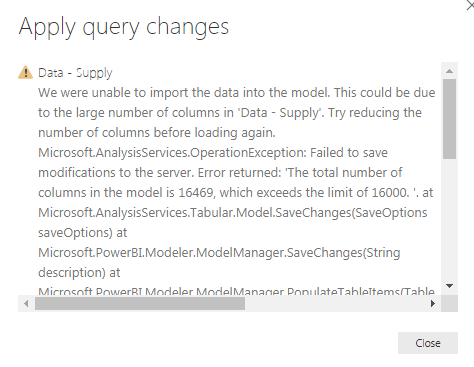
okie i've got a new error message. it said i have too many columns and checked my query it created a lot columns.. i don't know why this happend? cos my origianl excel file is exactly same..
Hi @Anonymous
The maximum number of columns for every table is 16000 according to the documents.
Please delete some unnecessary columns before import or refresh.
Best Regards
Maggie
Check out the May 2026 Power BI update to learn about new features.
Sign up to receive a private message when registration opens and key events begin.
If you have recently started exploring Fabric, we'd love to hear how it's going. Your feedback can help with product improvements.
| User | Count |
|---|---|
| 29 | |
| 27 | |
| 25 | |
| 20 | |
| 14 |
| User | Count |
|---|---|
| 53 | |
| 47 | |
| 22 | |
| 19 | |
| 18 |