cancel
Showing results for 
Search instead for 
Did you mean: 

Learn from the best! Meet the four finalists headed to the FINALS of the Power BI Dataviz World Championships! Register now

Reply
ShrimpCreole
Helper I
Helper I

Refresh Problem Across all Datasets / Workplaces

I am having a persistent refresh problem across all my workplaces.  All my databases are in Excel and on my desktop.  Is there a simple solution or something I am everlooking with permissions?


Data source error: Scheduled refresh is disabled because at least one data source is missing credentials. To start the refresh again, go to this dataset's settings page and enter credentials for all data sources. Then reactivate scheduled refresh.
Cluster URI: WABI-US-EAST-A-PRIMARY-redirect.analysis.windows.net
Activity ID: 5660b1ed-af97-4e90-be1f-00528803563d
Request ID: 84c70b1e-b5bc-4b16-f8e4-533430627516
Time: 2022-09-22 14:09:50Z

1 ACCEPTED SOLUTION
AbbasG
Memorable Member
Memorable Member

@ShrimpCreole 

Make sure you have installed Personal gateway and it is signed in at the time of schedule refresh (If your data sources are on the local desktop).

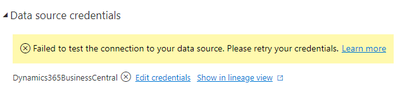
Also, go to the dataset settings ==> data source credentials and update the credentials before refreshing it again.


AbbasG_0-1663994553505.png

Hope this helps 🙂

View solution in original post

2 REPLIES 2
AbbasG
Memorable Member
Memorable Member

@ShrimpCreole 

Make sure you have installed Personal gateway and it is signed in at the time of schedule refresh (If your data sources are on the local desktop).

Also, go to the dataset settings ==> data source credentials and update the credentials before refreshing it again.


AbbasG_0-1663994553505.png

Hope this helps 🙂

lbendlin
Super User
Super User

All my databases are in Excel and on my desktop

Databases?   Do you mean data sources?


On your desktop?  So you need to use a personal gateway? In the dataset settings make sure the gateway is selected, and that the credentials are all specified.

Helpful resources

Announcements
Join our Fabric User Panel

Join our Fabric User Panel

Share feedback directly with Fabric product managers, participate in targeted research studies and influence the Fabric roadmap.

March Power BI Update Carousel

Power BI Community Update - March 2026

Check out the March 2026 Power BI update to learn about new features.