cancel
Showing results for 
Search instead for 
Did you mean: 

The Power BI Data Visualization World Championships is back! Get ahead of the game and start preparing now! Learn more

Reply
flunte70
Helper I
Helper I

Refresh Issue

I have a report from where I get the data from an Excel file.


The last three month I have appended data to the Excel file and when I Refresh I can see the data in my Data in PowerBI.

Today I have done the same - but the data is not visible?


I have 8000 records in my Excel file and add 2000 records - but when the data has been refreshed - only 8000 records are visible in PowerBI?


I dont get any errors so what can be wrong?


I have off cause checked the data source and am sure it is the right Excel file that I am updating.

1 ACCEPTED SOLUTION

I realized that the records I tried to add was not in the same format - so after changing the format - all the records are in PowerBI now 🙂


Thanks for your time!

View solution in original post

7 REPLIES 7
Anonymous
Not applicable

@flunte70,

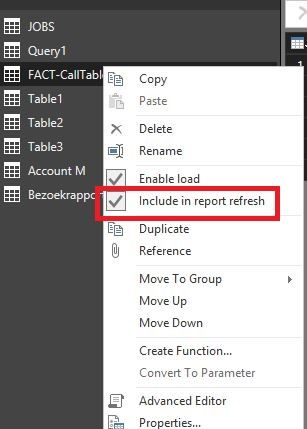
Do you refresh the data in Power BI Desktop? If so, do you enable the "Include in report refresh"option?

1.JPG

Regards,
Lydia

Thanks for the input!

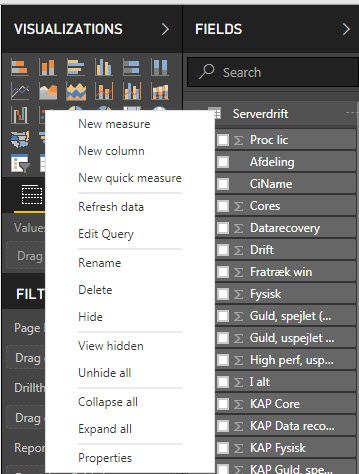
When I Refresh, I right click on the table and when I do so, I don't have the "Include in report refresh"option?


28-02-2018 07-31-31.jpg

Anonymous
Not applicable

@flunte70,

Go to Query Editor of Power BI Desktop, right click  your table and check if the include in report refresh option is enabled.

Regards,

Lydia

Hi again,


Thanks, I have the option checked in my Query editor.


When I look in my Excel I have 10.000 records - but in my PowerBI table I only have 8.000 records?

Anonymous
Not applicable

@flunte70,

Would you mind sharing the Excel file so that I can test? You can share the Excel file via Private Message.

Regards,
Lydia

I realized that the records I tried to add was not in the same format - so after changing the format - all the records are in PowerBI now 🙂


Thanks for your time!

It's very kind of you, thanks!


Before I do, I will just test myself if I can get all the records if I start a new report.


I will get back tomorrow.


Thanks again 🙂

Helpful resources

Announcements
Power BI DataViz World Championships

Power BI Dataviz World Championships

The Power BI Data Visualization World Championships is back! Get ahead of the game and start preparing now!

December 2025 Power BI Update Carousel

Power BI Monthly Update - December 2025

Check out the December 2025 Power BI Holiday Recap!

FabCon Atlanta 2026 carousel

FabCon Atlanta 2026

Join us at FabCon Atlanta, March 16-20, for the ultimate Fabric, Power BI, AI and SQL community-led event. Save $200 with code FABCOMM.