Join us at FabCon Atlanta from March 16 - 20, 2026, for the ultimate Fabric, Power BI, AI and SQL community-led event. Save $200 with code FABCOMM.
Register now!The Power BI Data Visualization World Championships is back! It's time to submit your entry. Live now!
I have a data that records the member upgrade assessment of our member as below:
customer date prev_member_level current_member_level
John 1Jan2017 Classic Gold
John 4Apr2017 Gold Gold
John 15 Jun2017 Gold Platinum
John 1Dec2017 Platinum Gold
Mary 2Feb2017 Silver Gold
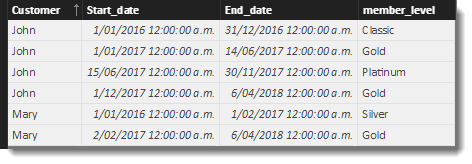
How can i reform the information above to be like table below?
customer start_date end_date member_level
John 1Jan2016 31Dec2016 Classic
John 1Jan2017 14Jun2017 Gold
John 15Jun2017 Today() Platinum
Mary 1Jan2016 1Feb2017 Silver
Mary 2Feb2017 6Apr2018 Gold
Solved! Go to Solution.
HI @Anonymous
This calculated table is getting close. There is a bit going on, but I think it addresses most of the quirks.
I have attached a PBIX file as well
New Table =
VAR RetVal =
ADDCOLUMNS(
'Table',
"Next Date",
MINX(
FILTER(
'Table',
'Table'[Customer] = EARLIER('Table'[Customer]) &&
'Table'[Date] > EARLIER('Table'[Date]) &&
[pre_member_level]<> [current_member_level]
),
[Date]-1)
)
VAR cleanTable = FILTER(RetVal,[current_member_level]<>[pre_member_level])
VAR Step2 =
SELECTCOLUMNS(
cleanTable ,
"Customer" , [Customer] ,
"Start_date" , [Date] ,
"end_date" , if(
ISBLANK([Next Date]),
TODAY(),
[Next Date]) ,
"member_level" , [current_member_level]
)
VAR FirstLines =
SELECTCOLUMNS(
GENERATE(SELECTCOLUMNS(SUMMARIZECOLUMNS('Table'[Customer],"end_date" , MIN('Table'[Date])),"C",[Customer],"D",[end_date]),filter('Table','Table'[Customer]=[C] && 'Table'[Date]=[D])),
"Customer",[Customer] ,
"Start_date",DATE(2016,1,1) ,
"End_date",[Date]-1,
"member_level",[pre_member_level]
)
RETURN UNION( FirstLines,Step2)
HI @Anonymous
This calculated table is getting close. There is a bit going on, but I think it addresses most of the quirks.
I have attached a PBIX file as well
New Table =
VAR RetVal =
ADDCOLUMNS(
'Table',
"Next Date",
MINX(
FILTER(
'Table',
'Table'[Customer] = EARLIER('Table'[Customer]) &&
'Table'[Date] > EARLIER('Table'[Date]) &&
[pre_member_level]<> [current_member_level]
),
[Date]-1)
)
VAR cleanTable = FILTER(RetVal,[current_member_level]<>[pre_member_level])
VAR Step2 =
SELECTCOLUMNS(
cleanTable ,
"Customer" , [Customer] ,
"Start_date" , [Date] ,
"end_date" , if(
ISBLANK([Next Date]),
TODAY(),
[Next Date]) ,
"member_level" , [current_member_level]
)
VAR FirstLines =
SELECTCOLUMNS(
GENERATE(SELECTCOLUMNS(SUMMARIZECOLUMNS('Table'[Customer],"end_date" , MIN('Table'[Date])),"C",[Customer],"D",[end_date]),filter('Table','Table'[Customer]=[C] && 'Table'[Date]=[D])),
"Customer",[Customer] ,
"Start_date",DATE(2016,1,1) ,
"End_date",[Date]-1,
"member_level",[pre_member_level]
)
RETURN UNION( FirstLines,Step2)
The Power BI Data Visualization World Championships is back! It's time to submit your entry.
Check out the January 2026 Power BI update to learn about new features.
| User | Count |
|---|---|
| 56 | |
| 42 | |
| 39 | |
| 23 | |
| 21 |
| User | Count |
|---|---|
| 144 | |
| 106 | |
| 63 | |
| 38 | |
| 31 |