This time we’re going bigger than ever. Fabric, Power BI, SQL, AI and more. We're covering it all. You won't want to miss it.
Learn moreDid you hear? There's a new SQL AI Developer certification (DP-800). Start preparing now and be one of the first to get certified. Register now
Hi everyone,
I have the following thable where I have 3 columns:
What I need to doo, is to add a new column where it indicates in a binary code ( 0 , 1) wether the new register is in fact a new absence (1) or just a continuity of a previous one (0).
To do that, I need to make sure that both registers belong to the same worker, and then analyse if were sequential in time (at least 4 days between them) and corresponded to the same type of absence.
In this regard, form the sample, from "02/01/2019" to "14/01/2019" it would represent the same absence while the register starting in "30/01/2019" would be a new one.
In excel language, in order to get that new column would be as simple as: IF(AND(A1=A2;C1=C2;B2-B1+1<5);0;1).
However, this is an unpivoted table from Excel and I've no idea how to reference in DAX language that "previous row" in order to compare it with the "current one" in an "if" function for the new calculated column.
Any tips and examples you can bring will be much appriciated!
Thank you all!
Solved! Go to Solution.
Hello @GuillemXII
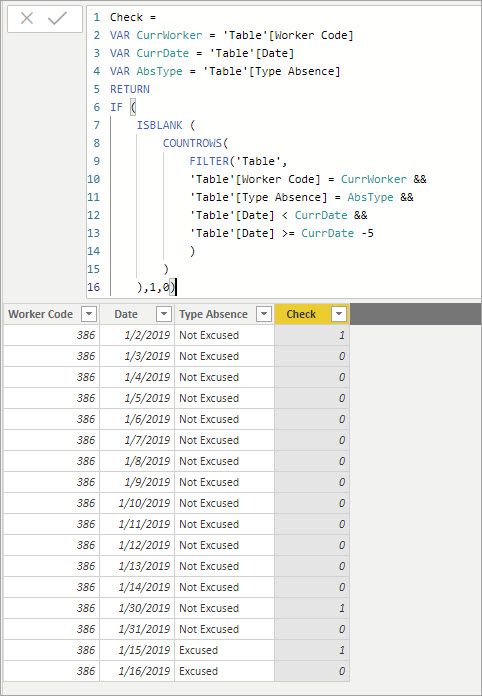
Give this a try. It filters the table based on the info from the current row then counts the number of rows returned. If the count is >= 1 it is a continuing absence.
Check =
VAR CurrWorker = 'Table'[Worker Code]
VAR CurrDate = 'Table'[Date]
VAR AbsType = 'Table'[Type Absence]
RETURN
IF (
ISBLANK (
COUNTROWS(
FILTER('Table',
'Table'[Worker Code] = CurrWorker &&
'Table'[Type Absence] = AbsType &&
'Table'[Date] < CurrDate &&
'Table'[Date] >= CurrDate -5
)
)
),1,0)Hello @GuillemXII
Give this a try. It filters the table based on the info from the current row then counts the number of rows returned. If the count is >= 1 it is a continuing absence.
Check =
VAR CurrWorker = 'Table'[Worker Code]
VAR CurrDate = 'Table'[Date]
VAR AbsType = 'Table'[Type Absence]
RETURN
IF (
ISBLANK (
COUNTROWS(
FILTER('Table',
'Table'[Worker Code] = CurrWorker &&
'Table'[Type Absence] = AbsType &&
'Table'[Date] < CurrDate &&
'Table'[Date] >= CurrDate -5
)
)
),1,0)Check out the April 2026 Power BI update to learn about new features.
Sign up to receive a private message when registration opens and key events begin.
If you have recently started exploring Fabric, we'd love to hear how it's going. Your feedback can help with product improvements.
| User | Count |
|---|---|
| 37 | |
| 32 | |
| 27 | |
| 24 | |
| 17 |
| User | Count |
|---|---|
| 70 | |
| 50 | |
| 31 | |
| 26 | |
| 22 |