cancel
Showing results for 
Search instead for 
Did you mean: 

The Power BI Data Visualization World Championships is back! It's time to submit your entry. Live now!

Reply
matthewjudd
Regular Visitor

[Redacted]

 
2 REPLIES 2
JorgePinho
Solution Sage
Solution Sage

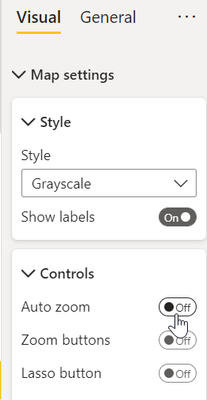
I'm not sure if I understood your problem. However, I think that disabling Auto zoom will solve it:

JorgePinho_0-1667832032434.png


@JorgePinho wrote:

I'm not sure if I understood your problem. However, I think that disabling Auto zoom will solve it:


Thanks for getting back to me @JorgePinho. I took a look at removing the auto-zoom feature and that does not result in the desired outcome. I still want the map to be able to zoom when a user clicks on a location in either of the tables on the left hand side of the page - I just don't want the zoom to reset to default when they click on a map bubble (which I suspect they will attempt).

Helpful resources

Announcements
Power BI DataViz World Championships

Power BI Dataviz World Championships

The Power BI Data Visualization World Championships is back! It's time to submit your entry.

January Power BI Update Carousel

Power BI Monthly Update - January 2026

Check out the January 2026 Power BI update to learn about new features.

FabCon Atlanta 2026 carousel

FabCon Atlanta 2026

Join us at FabCon Atlanta, March 16-20, for the ultimate Fabric, Power BI, AI and SQL community-led event. Save $200 with code FABCOMM.