This time we’re going bigger than ever. Fabric, Power BI, SQL, AI and more. We're covering it all. You won't want to miss it.
Learn moreLevel up your Power BI skills this month - build one visual each week and tell better stories with data! Get started
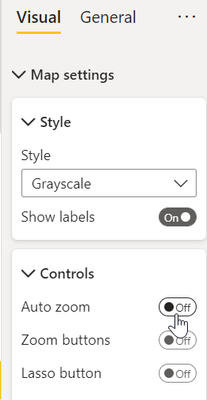
I'm not sure if I understood your problem. However, I think that disabling Auto zoom will solve it:
@JorgePinho wrote:I'm not sure if I understood your problem. However, I think that disabling Auto zoom will solve it:
Thanks for getting back to me @JorgePinho. I took a look at removing the auto-zoom feature and that does not result in the desired outcome. I still want the map to be able to zoom when a user clicks on a location in either of the tables on the left hand side of the page - I just don't want the zoom to reset to default when they click on a map bubble (which I suspect they will attempt).
Check out the April 2026 Power BI update to learn about new features.
Sign up to receive a private message when registration opens and key events begin.
If you have recently started exploring Fabric, we'd love to hear how it's going. Your feedback can help with product improvements.
| User | Count |
|---|---|
| 37 | |
| 32 | |
| 27 | |
| 24 | |
| 17 |
| User | Count |
|---|---|
| 70 | |
| 50 | |
| 31 | |
| 26 | |
| 22 |