Hi!
I am relatively new in using Power BI. In the current file I'm working on, I am facing some challenges.
Here are my sample tables (refer to first 2 screen shots)
Main Table - combined of monthly data
| Date | Client | Volume | KPI | Delivered from |
| 5-Dec | A | 50 | Pass | Location X |
| 18-Dec | B | 20 | Pass | Location Y |
| 23-Dec | A | 30 | Fail | Location X |
| 3-Feb | B | 10 | Fail | Location Z |
| 14-Feb | C | 20 | Pass | Location X |
| 27-Feb | C | 30 | Pass | Location Z |
| 8-Mar | A | 20 | Fail | Location Y |
| 19-Mar | B | 20 | Fail | Location Y |
| 26-Mar | C | 30 | Pass | Location Z |
Category Table - combined data based on quarterly survey results. However, it's not required for the client to answer the quarterly survey.
| Date | Client | Category |
| Mar 2019 | A | Promoter |
| Mar 2019 | B | Detractor |
| Dec 2018 | A | Detractor |
| Dec 2018 | C | Promoter |
| Sept 2018 | C | Promoter |
| Sept 2018 | B | Promoter |
I should have an output like below but illustrated in 3 different scenarios (depending on the month chosen by the reader).
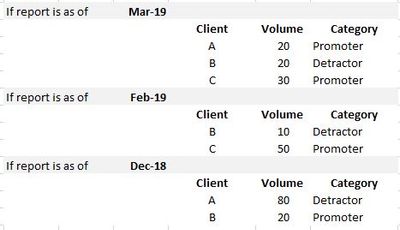 Table to be reported
The category column should display the most recent category of the client, depending on the month chosen by the reader. Below illustrates on how the report should look like in connection with the tables.
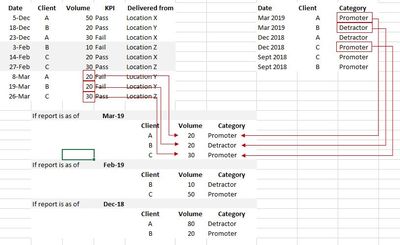

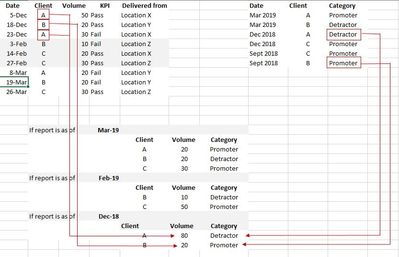
I have 2 main challenges:
- What do you suggest on how I would connect the Main table and the Category table, considering that the Category table can be repeating Client? I am thinking that I should duplicate the raw data from the Category Table and change their dates into months that are not shown in the Category Table (i.e. February, January, November, etc...). and then add additional column wherein I merged the Date and Client - this would be my reference value. Then I would create a relationship with the Main table by adding a new column wherein I merged the Client (from Main Table) and Date (from Main Table) as well. However, you guys might have an easier way of creating the relationship for the 2 tables.
- Next challenge is how do I get the most recent value? I have seen some forum questions asking for the recent value but their values are number data types. What I have is Text.
I hope you guys could help me out!
THank you
DK


