Get Fabric or SQL Certified for Free.
Get certified for free when you join Fabric Data Days 2026 and dive into Fabric, Power BI, SQL, AI, and other essential data skills.
Join now- Power BI forums
- Get Help with Power BI
- Desktop
- Service
- Report Server
- Power Query
- Mobile Apps
- Developer
- DAX Commands and Tips
- Custom Visuals Development Discussion
- Health and Life Sciences
- Power BI Spanish forums
- Translated Spanish Desktop
- Training and Consulting
- Instructor Led Training
- Dashboard in a Day for Women, by Women
- Galleries
- Data Stories Gallery
- Themes Gallery
- Contests Gallery
- QuickViz Gallery
- Quick Measures Gallery
- Visual Calculations Gallery
- Notebook Gallery
- Translytical Task Flow Gallery
- TMDL Gallery
- R Script Showcase
- Webinars and Video Gallery
- Ideas
- Custom Visuals Ideas (read-only)
- Issues
- Issues
- Events
- Upcoming Events
Try your skills in the Power BI Dataviz World Championship! Round one ends June 26. Join now
- Power BI forums
- Forums
- Get Help with Power BI
- Desktop
- Re: Rearranging Matrix/Table
- Subscribe to RSS Feed
- Mark Topic as New
- Mark Topic as Read
- Float this Topic for Current User
- Bookmark
- Subscribe
- Printer Friendly Page

- Mark as New
- Bookmark
- Subscribe
- Mute
- Subscribe to RSS Feed
- Permalink
- Report Inappropriate Content
Rearranging Matrix/Table
Hi,
I am working with a matrix visual to display Report Nmes, URLs and Report Descriptions.
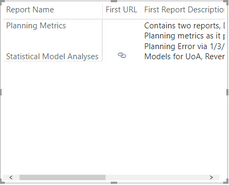
I need the description instead to be diplayed below each report name, instead of in its own column.
Like I said earlier, I'm using the matrix, but actively searching for any visual that might satisfy these needs in a better way - open to suggestions if you have any in mind!
Solved! Go to Solution.


- Mark as New
- Bookmark
- Subscribe
- Mute
- Subscribe to RSS Feed
- Permalink
- Report Inappropriate Content
Not sure if you can get display exactly like that easily. But concatenate your name and report with a newline character in a new column or formula and try.
Refer
https://community.powerbi.com/t5/Desktop/How-to-add-a-line-break-in-a-text-concatenation/td-p/382028
- Mark as New
- Bookmark
- Subscribe
- Mute
- Subscribe to RSS Feed
- Permalink
- Report Inappropriate Content
not very clear on
I need the description instead to be diplayed below each report name, instead of in its own column.
Can you please explain with an example. If possible please share a sample pbix file after removing sensitive information.
Thanks
- Mark as New
- Bookmark
- Subscribe
- Mute
- Subscribe to RSS Feed
- Permalink
- Report Inappropriate Content
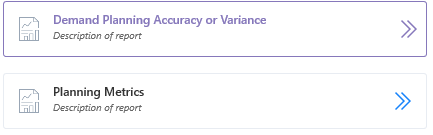
@amitchandak Below is the example I have. Note how the description is printed below each report name. The hyperlink icons in my report are replacing the >> arrows seen below.
- Mark as New
- Bookmark
- Subscribe
- Mute
- Subscribe to RSS Feed
- Permalink
- Report Inappropriate Content
Not sure if you can get display exactly like that easily. But concatenate your name and report with a newline character in a new column or formula and try.
Refer
https://community.powerbi.com/t5/Desktop/How-to-add-a-line-break-in-a-text-concatenation/td-p/382028
- Mark as New
- Bookmark
- Subscribe
- Mute
- Subscribe to RSS Feed
- Permalink
- Report Inappropriate Content
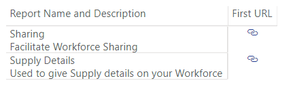
Alright, the column I created was done through this statement.
master[Report Name] & UNICHAR(10) & master[Report Description]
And here is what I was able to create. Is this what you were getting at, @amitchandak ?
- Mark as New
- Bookmark
- Subscribe
- Mute
- Subscribe to RSS Feed
- Permalink
- Report Inappropriate Content


- Mark as New
- Bookmark
- Subscribe
- Mute
- Subscribe to RSS Feed
- Permalink
- Report Inappropriate Content
If first column is wide enought, it might work
Helpful resources

Data Days 2026
Don't miss out on Data Days, June 15 through August 7. Learn Fabric, Power BI, SQL, AI and more.

Power BI DataViz World Championships - June 2026
A new Power BI DataViz World Championship is coming this June! Don't miss out on submitting your entry.

| User | Count |
|---|---|
| 24 | |
| 22 | |
| 22 | |
| 21 | |
| 13 |


| User | Count |
|---|---|
| 66 | |
| 56 | |
| 45 | |
| 44 | |
| 30 |


