We've captured the moments from FabCon & SQLCon that everyone is talking about, and we are bringing them to the community, live and on-demand. Starts on April 14th. Register now
Hi,
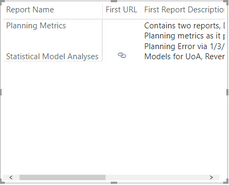
I am working with a matrix visual to display Report Nmes, URLs and Report Descriptions.
I need the description instead to be diplayed below each report name, instead of in its own column.
Like I said earlier, I'm using the matrix, but actively searching for any visual that might satisfy these needs in a better way - open to suggestions if you have any in mind!
Solved! Go to Solution.
Not sure if you can get display exactly like that easily. But concatenate your name and report with a newline character in a new column or formula and try.
Refer
https://community.powerbi.com/t5/Desktop/How-to-add-a-line-break-in-a-text-concatenation/td-p/382028
not very clear on
I need the description instead to be diplayed below each report name, instead of in its own column.
Can you please explain with an example. If possible please share a sample pbix file after removing sensitive information.
Thanks
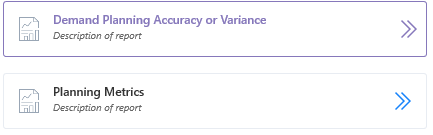
@amitchandak Below is the example I have. Note how the description is printed below each report name. The hyperlink icons in my report are replacing the >> arrows seen below.
Here is what I am modeling.
Not sure if you can get display exactly like that easily. But concatenate your name and report with a newline character in a new column or formula and try.
Refer
https://community.powerbi.com/t5/Desktop/How-to-add-a-line-break-in-a-text-concatenation/td-p/382028
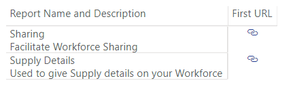
Alright, the column I created was done through this statement.
master[Report Name] & UNICHAR(10) & master[Report Description]
And here is what I was able to create. Is this what you were getting at, @amitchandak ?
If you have recently started exploring Fabric, we'd love to hear how it's going. Your feedback can help with product improvements.
A new Power BI DataViz World Championship is coming this June! Don't miss out on submitting your entry.
| User | Count |
|---|---|
| 56 | |
| 40 | |
| 36 | |
| 18 | |
| 18 |
| User | Count |
|---|---|
| 70 | |
| 67 | |
| 38 | |
| 34 | |
| 23 |