Join us at FabCon Atlanta from March 16 - 20, 2026, for the ultimate Fabric, Power BI, AI and SQL community-led event. Save $200 with code FABCOMM.
Register now!The Power BI Data Visualization World Championships is back! Get ahead of the game and start preparing now! Learn more
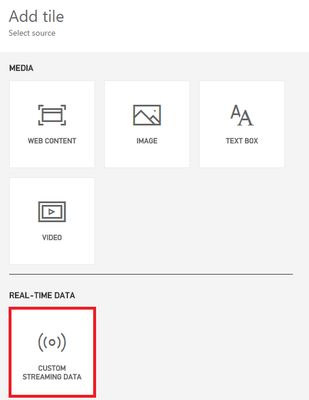
When I go to add a tile there is no option available in the "REAL-TIME" DATA box. How is that enabled?
Thanks.
Hi @mgustus,
Which option was disable under "Real-Time" data? Did you mean the image control? Or there is no dataset selection for you in the drop down list?
Please follow this article to get correct steps of how to build a Real-time Dashboard.
Thanks,
Yuliana Gu
Let me close this out. The image was not there when I initially went to start exploring this feature. Several hours later after my post, it showed up. I tried different browsers all with the same result.
Thank you for the link. I know I will have more questions and look forward to the education.
The Power BI Data Visualization World Championships is back! Get ahead of the game and start preparing now!
| User | Count |
|---|---|
| 39 | |
| 37 | |
| 33 | |
| 33 | |
| 29 |
| User | Count |
|---|---|
| 132 | |
| 90 | |
| 78 | |
| 66 | |
| 65 |