Don't miss your chance to take the Fabric Data Engineer (DP-700) exam on us!
Learn moreNext up in the FabCon + SQLCon recap series: The roadmap for Microsoft SQL and Maximizing Developer experiences in Fabric. All sessions are available on-demand after the live show. Register now
Hi all,
I built a simple index for each row in my data set that is a weighted linear combination of several columns. The weights are what-if parameters that the user can input and adjust to see the index change on the fly. Now, I want to rescale this raw index into a score out of 100. Conceptually, the mathematics for that are simple:
{Index - MIN(Index) / MAX(Index) - MIN(Index)} * 100
However, I'm having trouble implementing this as a measure that will calculate and change on the fly when the user updates the parameters.
Here is the weighted linear combination as a measure:
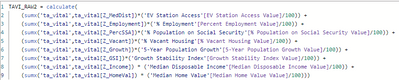
I tried using variables to yield the scores out of 100 for each row, but what I have currently yields NaN values.
Any thoughts on how I might be able to get to the scores and keep them dynamic so they change when the parameters are adjusted?
Thanks
Solved! Go to Solution.
Just following up on this with the solution. The issue is with the min/max calculations. MINX and MAXX are evaluated over every row in the data where the measure is calculated. They don't "anchor" to the max/min across all rows. Had to nest an all function:
Nothing else stands out as the possible cause of the issue. Your use case (in measures) is basically what what-if parameters are for.
Probably not the issue... but one thing that jumps out at me is the use of SUMX and MAXX/MINX. Because you're just looking at a single value in the table SUM() and SUMX() should return the same thing, as would MINX/MAXX.
What I would do at this stage, is test the return values of each of the VARs you've declared to narrow down the source of the issue.
If you're creating this as a 'Column' in DAX, column evaluation is done once when the data is loaded. Changing a parameter will not cause the table to re-evaluate.
Referring to parameter values in a column calculation will yield BLANK() values, which is why your calculations are returning NaNs.
You may be able to implement this as a MEASURE instead, but it depends on what you plan to do with it.
Yeah I did start with attemtping a calculated column for everything but like you said, columns added to the data will not update on the fly. I'm trying to do all of this using measures. I think part of the problem is telling PowerBI to duplicate the 0/100 scoring for each value on an axis. I can create some simple measures for Min/Max. The trouble starts when I try to perform the mathematics with those measures and the "i-th" value of the raw index.
If you have recently started exploring Fabric, we'd love to hear how it's going. Your feedback can help with product improvements.
A new Power BI DataViz World Championship is coming this June! Don't miss out on submitting your entry.
Share feedback directly with Fabric product managers, participate in targeted research studies and influence the Fabric roadmap.
| User | Count |
|---|---|
| 48 | |
| 44 | |
| 40 | |
| 18 | |
| 18 |
| User | Count |
|---|---|
| 69 | |
| 69 | |
| 32 | |
| 32 | |
| 32 |