This is best Fabric, Power BI, SQL and AI community event. How do we know? The last event sold out! Save €200 with code FABCMTY200.
Register nowA new Data Days event is coming soon! This time we’re going bigger than ever. Fabric, Power BI, SQL, AI and more. Don't miss out.
Hi all,
Long story short, I have a Slicer using Text values with lots of ranges. I want to re-order the Text values so that 'Less than xxx' comes first and 'More than xxx' comes last. Any way to do that?
Martin
Solved! Go to Solution.
Hi @Anonymous
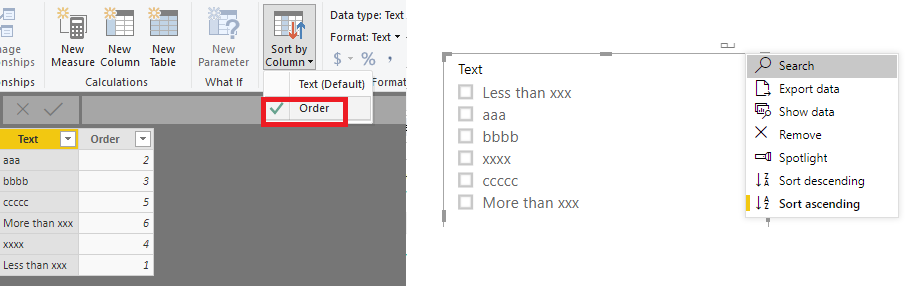
You may create an order table like below and use Sort by column.
Reference:https://community.powerbi.com/t5/Desktop/SortBy-use-as-order-by-any-int-column/m-p/663882#M319161
Regards,
Hi @Anonymous
You may create an order table like below and use Sort by column.
Reference:https://community.powerbi.com/t5/Desktop/SortBy-use-as-order-by-any-int-column/m-p/663882#M319161
Regards,
Thanks for the reply. My data did have an extra col that is linked to my big data set, where Value was for eg; 5, 15, 25 etc and the corresponding Text col similar to 'Less than 10', '10 to 19' and 'More than 20' and Order then 1,2,3.
I thought that was working but it is not.
I hope that makes sense 🙂
FYI, I got this to work by adding an order col to my table as advised. I think the step missing in the explanation was to highlight my Slicer then select the required field in the Fields list (so it has a yellow border, not just checked), then go to the Sort by Column button and select the new 'Order' col.
Anyway, I got there in the end so thanks 🙂
Check out the May 2026 Power BI update to learn about new features.
Sign up to receive a private message when registration opens and key events begin.
If you have recently started exploring Fabric, we'd love to hear how it's going. Your feedback can help with product improvements.
| User | Count |
|---|---|
| 31 | |
| 26 | |
| 23 | |
| 22 | |
| 15 |
| User | Count |
|---|---|
| 62 | |
| 47 | |
| 28 | |
| 24 | |
| 21 |