Join us at FabCon Atlanta from March 16 - 20, 2026, for the ultimate Fabric, Power BI, AI and SQL community-led event. Save $200 with code FABCOMM.
Register now!Get Fabric Certified for FREE during Fabric Data Days. Don't miss your chance! Request now
Good morning,
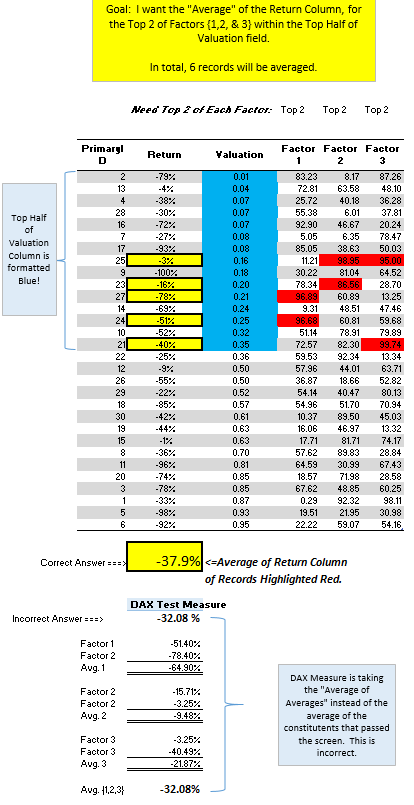
I have a DAX measure that has been very useful. However, I discovered it was calculating the "average of averages" instead of the average of records.
Below, the measure is capturing the Top 2 of three different factors. Instead of averaging the 6 records together, it is calculating the average of the average of the 3x Top 2's.
DAX Test Measure :=
CALCULATE (
AVERAGEX (
UNION (
TOPN ( 2, Table1, Table1[Factor 1] ),
TOPN ( 2, Table1, Table1[Factor 2] ),
TOPN ( 2, Table1, Table1[Factor 3] )
),
[Return]
),
FILTER ( Table1, [Valuation] <= PERCENTILE.INC ( [Valuation], 0.5 ) )
)
Is their a method to re-write the above DAX measure so it calculates the average of the records instead of the 'avg. of averages'?
Thank you,
James K
Solved! Go to Solution.
Hi, please try with this:
Correct Answer=
AVERAGEX (
DISTINCT (
UNION (
SELECTCOLUMNS (
TOPN (
2,
FILTER (
Factors,
Factors[Valuation] <= PERCENTILE.INC ( Factors[Valuation], 0,5 )
),
Factors[Factor 1]
),
"ID", Factors[PrimaryID],
"Return", Factors[Return]
),
SELECTCOLUMNS (
TOPN (
2,
FILTER (
Factors,
Factors[Valuation] <= PERCENTILE.INC ( Factors[Valuation], 0,5 )
),
Factors[Factor 2]
),
"ID", Factors[PrimaryID],
"Return", Factors[Return]
),
SELECTCOLUMNS (
TOPN (
2,
FILTER (
Factors,
Factors[Valuation] <= PERCENTILE.INC ( Factors[Valuation], 0,5 )
),
Factors[Factor 3]
),
"ID", Factors[PrimaryID],
"Return", Factors[Return]
)
)
),
[Return]
)Regards
Victor
Lima - Peru
Is [Return] an average measure?
Proud to be a Super User!
Yes, [Return] is the column that will be averaged at a record level. It's technically records of stocks that will be averaged for a portfolio.
More information: Below is a link to my sample file and a visual of what I'm trying to accomplish with the measure.
https://www.dropbox.com/s/ycotbvtcpipg7rk/DAX%20Oppty%20Measure.xlsx?dl=0
Hi, please try with this:
Correct Answer=
AVERAGEX (
DISTINCT (
UNION (
SELECTCOLUMNS (
TOPN (
2,
FILTER (
Factors,
Factors[Valuation] <= PERCENTILE.INC ( Factors[Valuation], 0,5 )
),
Factors[Factor 1]
),
"ID", Factors[PrimaryID],
"Return", Factors[Return]
),
SELECTCOLUMNS (
TOPN (
2,
FILTER (
Factors,
Factors[Valuation] <= PERCENTILE.INC ( Factors[Valuation], 0,5 )
),
Factors[Factor 2]
),
"ID", Factors[PrimaryID],
"Return", Factors[Return]
),
SELECTCOLUMNS (
TOPN (
2,
FILTER (
Factors,
Factors[Valuation] <= PERCENTILE.INC ( Factors[Valuation], 0,5 )
),
Factors[Factor 3]
),
"ID", Factors[PrimaryID],
"Return", Factors[Return]
)
)
),
[Return]
)Regards
Victor
Lima - Peru
Insane solution! I have been working on this all morning with several variations of Calculate/ TopN/ RankX/ Multiple Filter/ etc. This is awesome help & I really appreciate it. You the man! I don't fully understand how it works, but I'll study it to death & see if I can't make some sense of it.
Thank you,
James
Check out the November 2025 Power BI update to learn about new features.
Advance your Data & AI career with 50 days of live learning, contests, hands-on challenges, study groups & certifications and more!