Join us at FabCon Atlanta from March 16 - 20, 2026, for the ultimate Fabric, Power BI, AI and SQL community-led event. Save $200 with code FABCOMM.
Register now!The Power BI Data Visualization World Championships is back! Get ahead of the game and start preparing now! Learn more
Good morning,
I have a DAX measure that has been very useful. However, I discovered it was calculating the "average of averages" instead of the average of records.
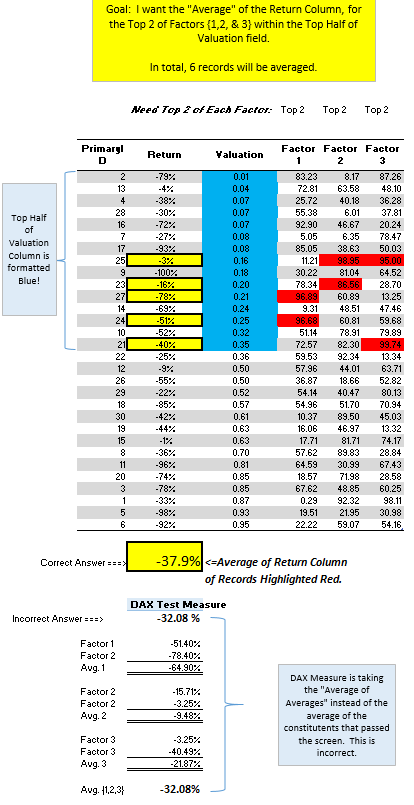
Below, the measure is capturing the Top 2 of three different factors. Instead of averaging the 6 records together, it is calculating the average of the average of the 3x Top 2's.
DAX Test Measure :=
CALCULATE (
AVERAGEX (
UNION (
TOPN ( 2, Table1, Table1[Factor 1] ),
TOPN ( 2, Table1, Table1[Factor 2] ),
TOPN ( 2, Table1, Table1[Factor 3] )
),
[Return]
),
FILTER ( Table1, [Valuation] <= PERCENTILE.INC ( [Valuation], 0.5 ) )
)
Is their a method to re-write the above DAX measure so it calculates the average of the records instead of the 'avg. of averages'?
Thank you,
James K
Solved! Go to Solution.
Hi, please try with this:
Correct Answer=
AVERAGEX (
DISTINCT (
UNION (
SELECTCOLUMNS (
TOPN (
2,
FILTER (
Factors,
Factors[Valuation] <= PERCENTILE.INC ( Factors[Valuation], 0,5 )
),
Factors[Factor 1]
),
"ID", Factors[PrimaryID],
"Return", Factors[Return]
),
SELECTCOLUMNS (
TOPN (
2,
FILTER (
Factors,
Factors[Valuation] <= PERCENTILE.INC ( Factors[Valuation], 0,5 )
),
Factors[Factor 2]
),
"ID", Factors[PrimaryID],
"Return", Factors[Return]
),
SELECTCOLUMNS (
TOPN (
2,
FILTER (
Factors,
Factors[Valuation] <= PERCENTILE.INC ( Factors[Valuation], 0,5 )
),
Factors[Factor 3]
),
"ID", Factors[PrimaryID],
"Return", Factors[Return]
)
)
),
[Return]
)Regards
Victor
Lima - Peru
Is [Return] an average measure?
Proud to be a Super User!
Yes, [Return] is the column that will be averaged at a record level. It's technically records of stocks that will be averaged for a portfolio.
More information: Below is a link to my sample file and a visual of what I'm trying to accomplish with the measure.
https://www.dropbox.com/s/ycotbvtcpipg7rk/DAX%20Oppty%20Measure.xlsx?dl=0
Hi, please try with this:
Correct Answer=
AVERAGEX (
DISTINCT (
UNION (
SELECTCOLUMNS (
TOPN (
2,
FILTER (
Factors,
Factors[Valuation] <= PERCENTILE.INC ( Factors[Valuation], 0,5 )
),
Factors[Factor 1]
),
"ID", Factors[PrimaryID],
"Return", Factors[Return]
),
SELECTCOLUMNS (
TOPN (
2,
FILTER (
Factors,
Factors[Valuation] <= PERCENTILE.INC ( Factors[Valuation], 0,5 )
),
Factors[Factor 2]
),
"ID", Factors[PrimaryID],
"Return", Factors[Return]
),
SELECTCOLUMNS (
TOPN (
2,
FILTER (
Factors,
Factors[Valuation] <= PERCENTILE.INC ( Factors[Valuation], 0,5 )
),
Factors[Factor 3]
),
"ID", Factors[PrimaryID],
"Return", Factors[Return]
)
)
),
[Return]
)Regards
Victor
Lima - Peru
Insane solution! I have been working on this all morning with several variations of Calculate/ TopN/ RankX/ Multiple Filter/ etc. This is awesome help & I really appreciate it. You the man! I don't fully understand how it works, but I'll study it to death & see if I can't make some sense of it.
Thank you,
James
The Power BI Data Visualization World Championships is back! Get ahead of the game and start preparing now!
Check out the November 2025 Power BI update to learn about new features.
| User | Count |
|---|---|
| 59 | |
| 46 | |
| 42 | |
| 23 | |
| 18 |
| User | Count |
|---|---|
| 192 | |
| 125 | |
| 99 | |
| 67 | |
| 48 |