Share feedback directly with Fabric product managers, participate in targeted research studies and influence the Fabric roadmap.
Sign up nowGet Fabric certified for FREE! Don't miss your chance! Learn more
Hi All,
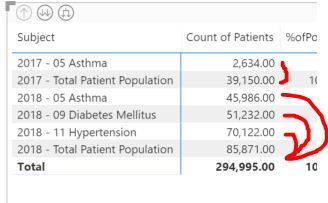
I am trying to divide each subject by "2017 - Total Population" and "2018 - Total Population" and get the percentage.
For example in 2017... 2017 05 Asthma / 2017 - Total Patient Population
For example in 2018... 2018-05 Asthma / 2018- Total Patient Population
2018 - 09 Diabete Mellitus / 2018- Total Patient Population
2018 - 11 Hypertension / 2018 - Total Patient Population
etc...
The problem I can't get over is that they are all in the same column "Subject".
I would keep 2017 in one column and 2018 in another.
Any suggestions would be awesome!!
thanks
Hi @kstudsrud,
Due to I could not reproduce your data structure, could you please offer your data structure and post your desired result if possibel?
Regards,
Daniel He
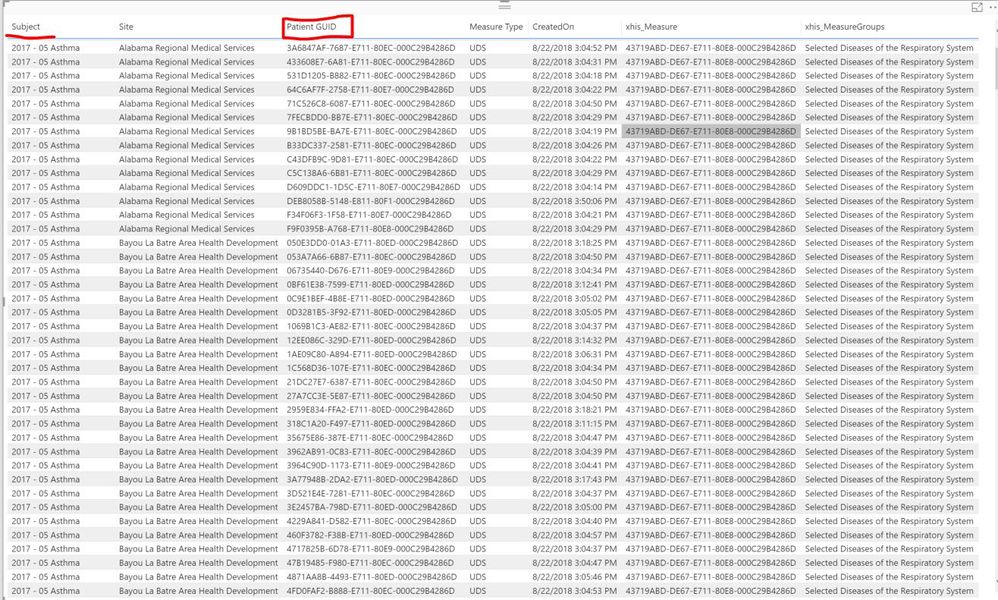
Each GUID pertains to a specific patinet. I am trying to take the # of rows that say "2017 05 Asthma" and divide it by the # of rows that say "2017- Total Patient Population".
I am trying do do this for all the different measures in the 'Subjuct' column in 2017/2018.
Hi,
Share the link from where i can download your PBI file.
Hi,
Why are they in the same column? Share the source data. Share it in a form that can be pasted in Excel.
Share feedback directly with Fabric product managers, participate in targeted research studies and influence the Fabric roadmap.
If you love stickers, then you will definitely want to check out our Community Sticker Challenge!
Check out the January 2026 Power BI update to learn about new features.
| User | Count |
|---|---|
| 62 | |
| 62 | |
| 42 | |
| 21 | |
| 18 |