Join us at FabCon Atlanta from March 16 - 20, 2026, for the ultimate Fabric, Power BI, AI and SQL community-led event. Save $200 with code FABCOMM.
Register now!The Power BI Data Visualization World Championships is back! Get ahead of the game and start preparing now! Learn more
I am experiencing a problem concerning my ranking formula and I am absolutely clueless to why. I cannot share the model as it contains contains company information. I will try to create a picture with screenshots where I have removed the names. My goal is to create two ranking measures: 1. ranking based on sales and 2. ranking based on margin.
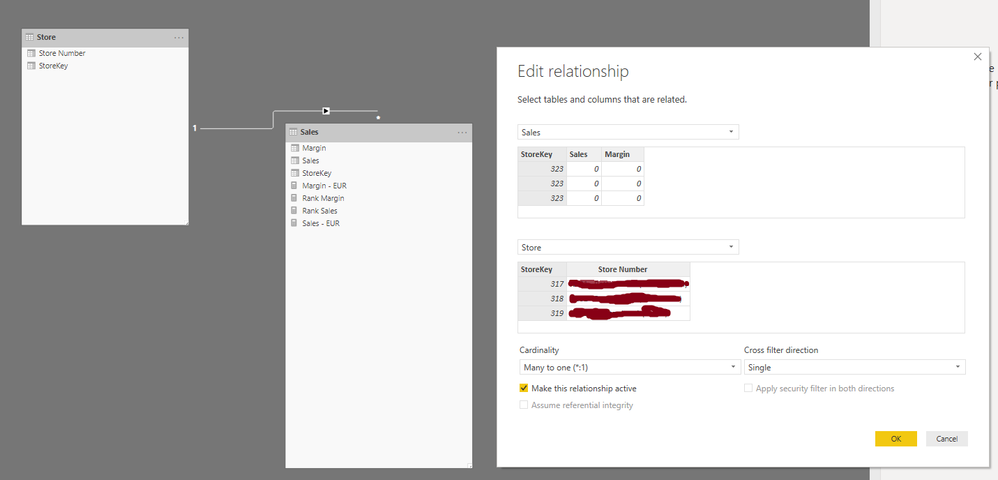
Right now I have come to the point where I have stripped all non related relations from the model but the ranking problem persists.
This is my current model: A FactSales table with one Store dimension table linked using a Many-to-One Single direction relation, based on the key.
How do my ranking measures look?
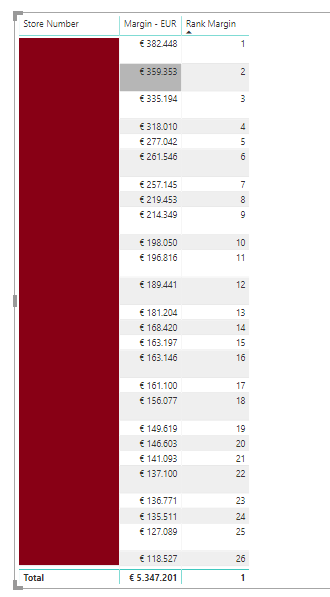
Then, if I just create a grid with Store Number, Margin and Rank Margin, everything looks fine:
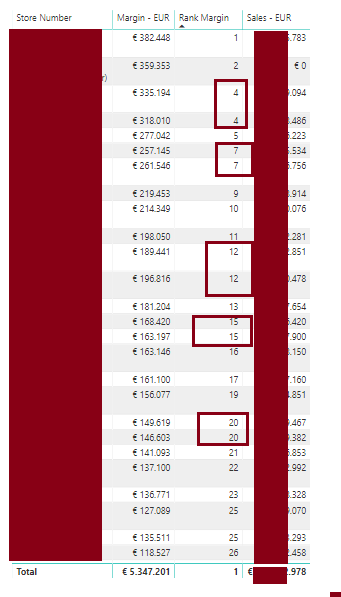
When I add the simple Sales measure, things start to get wrong. I cannot see why this is happening. The sales measure is simply Sum(Sales). See below.
I have also tried changing my ranking measure to below variants. This will achieve also incorrect results however.
I would appreciate your help on where to look next a lot. I cannot seem to understand why the ranking measure at first looks fine, but when I add a sales measure, it starts to get wrong.
Thanks a lot in advance.
@Anonymous ,
Please use dax below instead:
Rank Sales =
RANKX (
FILTER ( 'Store'; 'Store'[Store Number] IN VALUES ( 'Store'[Store Number] ) );
CALCULATE ( [Sales - EUR] )
)
Rank Margin =
RANKX (
FILTER ( 'Store'; 'Store'[Store Number] IN VALUES ( 'Store'[Store Number] ) );
CALCULATE ( [Margin - EUR] )
)
Community Support Team _ Jimmy Tao
If this post helps, then please consider Accept it as the solution to help the other members find it more quickly.
Thank you very much for your answer. I have tried your DAX code and it is not working either.
I think it is something in the relation, composition of the table or whatsoever. I have created a mockup model with very simple self created data in excel. The exact same measures as I have been using in my real model gave the correct results.
I simply do not know where to look for. If you have any suggestion what could produce my miraculous results, it would be awesome.
Thanks anyway for all your help!
I did not get it completely. But you need to use dense option. Chnage the values of last two parameters in RANKX.
Also refer this :https://radacad.com/how-to-use-rankx-in-dax-part-2-of-3-calculated-measures
Simply put:
My rankx measure is working. However, when I add a random other measure (f.e. sales) to the same grid, it stops working correctly.
@Anonymous
refer this ,
https://community.powerbi.com/t5/Desktop/RANKX-does-not-work-for-me-Any-help-appreciated/td-p/147705
Cheers,
Pravin Wattamwar
If it resolves your problem mark it as a solution and give kudos.
A calculated column is unfortunately not the solution as slicing by other dimensions is required. 😞
The Power BI Data Visualization World Championships is back! Get ahead of the game and start preparing now!
Check out the November 2025 Power BI update to learn about new features.
| User | Count |
|---|---|
| 59 | |
| 43 | |
| 42 | |
| 23 | |
| 17 |
| User | Count |
|---|---|
| 190 | |
| 122 | |
| 96 | |
| 66 | |
| 47 |