Join us at FabCon Atlanta from March 16 - 20, 2026, for the ultimate Fabric, Power BI, AI and SQL community-led event. Save $200 with code FABCOMM.
Register now!The Power BI Data Visualization World Championships is back! Get ahead of the game and start preparing now! Learn more
Hi All,
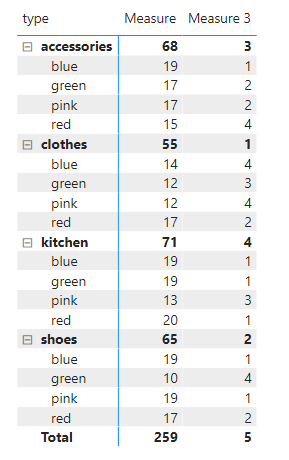
My data is in a matrix (like below) and I would like the ranking on TYPE to be fixed 1) shoes 2) clothes 3) accessories 4) kitchen but when i expand the + sign, i would like the measure to rank by descending order. is this even possible? thanks alot for the valuable help 🙂
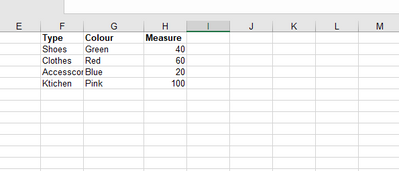
My dataset looks like this:
Solved! Go to Solution.
Hi @Anonymous ,
You will need to create another measure to calculate the value by type.
For example:
Measure = SUM('Table'[value])
Measure 2 = CALCULATE(SUM('Table'[value]),ALLEXCEPT('Table','Table'[type]))
Then use ISFILTERED() function to get different rank.
Measure 3 =
var _unexpand = RANKX(ALLSELECTED('Table'),[Measure 2],,ASC,Dense)
var _expand = RANKX(ALLEXCEPT('Table','Table'[color]),[Measure],,DESC)
return
IF(ISFILTERED('Table'[color]),_expand,_unexpand)
Best Regards,
Jay
Hi @Anonymous ,
You will need to create another measure to calculate the value by type.
For example:
Measure = SUM('Table'[value])
Measure 2 = CALCULATE(SUM('Table'[value]),ALLEXCEPT('Table','Table'[type]))
Then use ISFILTERED() function to get different rank.
Measure 3 =
var _unexpand = RANKX(ALLSELECTED('Table'),[Measure 2],,ASC,Dense)
var _expand = RANKX(ALLEXCEPT('Table','Table'[color]),[Measure],,DESC)
return
IF(ISFILTERED('Table'[color]),_expand,_unexpand)
Best Regards,
Jay
@Anonymous Function ISINSCOPE can help you. Measure should look like this:
measure=IF(ISINSCOPE([Colour]),_descRank,_ascRank)
Hi, sorry what is _descrank? is that also a measure?
It's your rank calculation.
The Power BI Data Visualization World Championships is back! Get ahead of the game and start preparing now!
Check out the November 2025 Power BI update to learn about new features.
| User | Count |
|---|---|
| 59 | |
| 43 | |
| 42 | |
| 23 | |
| 17 |
| User | Count |
|---|---|
| 190 | |
| 122 | |
| 96 | |
| 66 | |
| 46 |