cancel
Showing results for 
Search instead for 
Did you mean: 

Get Fabric Certified for FREE during Fabric Data Days. Don't miss your chance! Request now

Reply
Anonymous
Not applicable

Ranking of matrix

Hi All, 


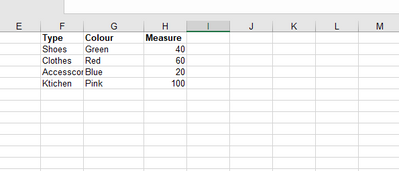
My data is in a matrix (like below) and I would like the ranking on TYPE to be fixed 1) shoes 2) clothes 3) accessories 4) kitchen but when i expand the + sign, i would like the measure to rank by descending order. is this even possible? thanks alot for the valuable help 🙂 


My dataset looks like this: 


evko_0-1634735295107.png


1 ACCEPTED SOLUTION
Anonymous
Not applicable

Hi @Anonymous ,


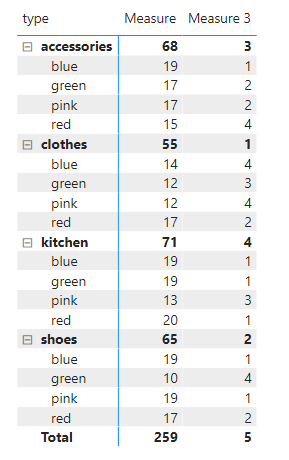
You will need to create another measure to calculate the value by type.

For example:

Measure = SUM('Table'[value])

Measure 2 = CALCULATE(SUM('Table'[value]),ALLEXCEPT('Table','Table'[type]))

Then use ISFILTERED() function to get different rank.

Measure 3 = 
var _unexpand = RANKX(ALLSELECTED('Table'),[Measure 2],,ASC,Dense)
var _expand = RANKX(ALLEXCEPT('Table','Table'[color]),[Measure],,DESC)
return
IF(ISFILTERED('Table'[color]),_expand,_unexpand)

Capture.PNG


Best Regards,

Jay

View solution in original post

4 REPLIES 4
Anonymous
Not applicable

Hi @Anonymous ,


You will need to create another measure to calculate the value by type.

For example:

Measure = SUM('Table'[value])

Measure 2 = CALCULATE(SUM('Table'[value]),ALLEXCEPT('Table','Table'[type]))

Then use ISFILTERED() function to get different rank.

Measure 3 = 
var _unexpand = RANKX(ALLSELECTED('Table'),[Measure 2],,ASC,Dense)
var _expand = RANKX(ALLEXCEPT('Table','Table'[color]),[Measure],,DESC)
return
IF(ISFILTERED('Table'[color]),_expand,_unexpand)

Capture.PNG


Best Regards,

Jay

Anonymous
Not applicable

@Anonymous Function ISINSCOPE can help you. Measure should look like this:

measure=IF(ISINSCOPE([Colour]),_descRank,_ascRank)

Anonymous
Not applicable

Hi, sorry what is _descrank? is that also a measure? 

Anonymous
Not applicable

It's your rank calculation.

Helpful resources

Announcements
November Power BI Update Carousel

Power BI Monthly Update - November 2025

Check out the November 2025 Power BI update to learn about new features.

Fabric Data Days Carousel

Fabric Data Days

Advance your Data & AI career with 50 days of live learning, contests, hands-on challenges, study groups & certifications and more!

FabCon Atlanta 2026 carousel

FabCon Atlanta 2026

Join us at FabCon Atlanta, March 16-20, for the ultimate Fabric, Power BI, AI and SQL community-led event. Save $200 with code FABCOMM.

Top Solution Authors
Top Kudoed Authors