Join us at FabCon Atlanta from March 16 - 20, 2026, for the ultimate Fabric, Power BI, AI and SQL community-led event. Save $200 with code FABCOMM.
Register now!The Power BI Data Visualization World Championships is back! Get ahead of the game and start preparing now! Learn more
Hi Power BI community. I am relatively new to Power BI so bear with me.
I have a table of data where each row represents a production run on a specific by a specific team on a specific model etc. There are many different defects that can occur and they are each respresented with a column in the table. For example, a production run on 9/9/19 could have a value of 200 in the 'Input' column, a value of 2 in the 'Defect 1' column, and a value of 10 in the 'Defect 7' column. The rest of the Defect columns in that row would have a value of zero in them.
I have a visual that shows the frequency that each specific defect occurs according to a date hierarchy. Say there are 10 defects. I would like to be able to make the visual only show the top three defects for a specific date range determined by a slicer.
I have looked into this and could only find information relating to the RANKX function which ranks values in a column. Since I need to rank actual columns by their sum this was not helpful to me.
Solved! Go to Solution.
Hello @Anonymous
The only way I know of to do what you are looking for is to unpivot the defects informatoin so you end up with 2 columns, defect type and value. Then you can do the ranking on the value column.
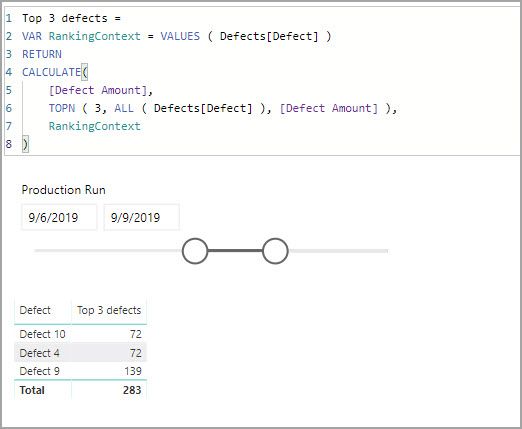
Top 3 defects =
VAR RankingContext = VALUES ( Defects[Defect] )
RETURN
CALCULATE(
[Defect Amount],
TOPN ( 3, ALL ( Defects[Defect] ), [Defect Amount] ),
RankingContext
)
I have attached my sample file for you to look at.
Hello @Anonymous
The only way I know of to do what you are looking for is to unpivot the defects informatoin so you end up with 2 columns, defect type and value. Then you can do the ranking on the value column.
Top 3 defects =
VAR RankingContext = VALUES ( Defects[Defect] )
RETURN
CALCULATE(
[Defect Amount],
TOPN ( 3, ALL ( Defects[Defect] ), [Defect Amount] ),
RankingContext
)
I have attached my sample file for you to look at.
The Power BI Data Visualization World Championships is back! Get ahead of the game and start preparing now!
| User | Count |
|---|---|
| 41 | |
| 37 | |
| 35 | |
| 35 | |
| 28 |
| User | Count |
|---|---|
| 134 | |
| 101 | |
| 71 | |
| 67 | |
| 65 |