Join us at FabCon Atlanta from March 16 - 20, 2026, for the ultimate Fabric, Power BI, AI and SQL community-led event. Save $200 with code FABCOMM.
Register now!The Power BI Data Visualization World Championships is back! Get ahead of the game and start preparing now! Learn more
Hey all,
I have a dataset which has data from multiple companies, departments with the corresponding revenue. I have a measure which ranks companies based on revenue within each department. So it not a total ranking, but a ranking on department level.
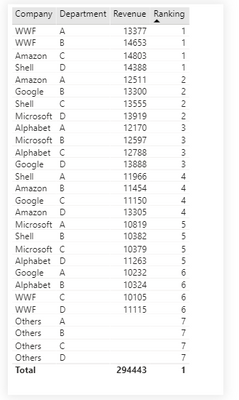
Because I want to create a Top N filter with an others category, I have created a seperate table with all the distict Company names, and the value "Others". In my ranking measure (see code below) I tell the measure to allocate the value -1 when the Company name equals "Others", else allocate the Ranking. However, as you can see in the table, the "Others" values are still included in the ranking, whilst I actually want to see the -1 value.
Does anyone know what I am doing wrong? Your help would be greatly appreciated. You can access the file her: https://www.dropbox.com/s/yhcfux2lzrnmm4f/RankingTestFile.pbix?dl=0
Ranking =
VAR Ranking =
RANKX(ALLSELECTED(CompanyNames[Company]),
CALCULATE(
SUM(Sheet1[Revenue]),
NOT ISBLANK(Sheet1[Company]),
ALLSELECTED(Sheet1[Company])
))
VAR isOthersSelected = SELECTEDVALUE(CompanyNames[Company])="Others"
VAR Result = if(isOthersSelected,-1,Ranking)
RETURN Result
Solved! Go to Solution.
Hi @BlackBull256 ,
Please follow these steps:
1. Create a Company table:
Company = UNION( VALUES(Sheet1[Company]) ,{"Others"})
2. Add a measure to calculate the sum of Revenue:
Sum Revenue = CALCULATE(SUM('Sheet1'[Revenue]),FILTER('Sheet1','Sheet1'[Company]=MAX('Company'[Company])))
3. Add the rank measure:
Rank = IF(MAX('Company'[Company])="Others",-1, RANKX(ALLSELECTED(Company),[Sum Revenue],,DESC,Dense))
The final output is shown below:
Best Regards,
Eyelyn Qin
If this post helps, then please consider Accept it as the solution to help the other members find it more quickly.
Hi @BlackBull256 ,
Please follow these steps:
1. Create a Company table:
Company = UNION( VALUES(Sheet1[Company]) ,{"Others"})
2. Add a measure to calculate the sum of Revenue:
Sum Revenue = CALCULATE(SUM('Sheet1'[Revenue]),FILTER('Sheet1','Sheet1'[Company]=MAX('Company'[Company])))
3. Add the rank measure:
Rank = IF(MAX('Company'[Company])="Others",-1, RANKX(ALLSELECTED(Company),[Sum Revenue],,DESC,Dense))
The final output is shown below:
Best Regards,
Eyelyn Qin
If this post helps, then please consider Accept it as the solution to help the other members find it more quickly.
@Anonymous , thank you very much, this works perfectly!
The Power BI Data Visualization World Championships is back! Get ahead of the game and start preparing now!
Check out the November 2025 Power BI update to learn about new features.
| User | Count |
|---|---|
| 59 | |
| 43 | |
| 42 | |
| 23 | |
| 17 |
| User | Count |
|---|---|
| 190 | |
| 122 | |
| 96 | |
| 66 | |
| 47 |