Join us at FabCon Atlanta from March 16 - 20, 2026, for the ultimate Fabric, Power BI, AI and SQL community-led event. Save $200 with code FABCOMM.
Register now!The Power BI Data Visualization World Championships is back! Get ahead of the game and start preparing now! Learn more
I am using rank and have come across a problem.
I want to rank by current month qty, which is fine, however where multiple customers have the same month qty they both get assigned the same rank number, as shown below
I want to rank by current month, and if 2 customers have the same sales qty in a month, then rank by the one with the highest 2018 sales qty , as shown by the example below.
is this possible?
Thanks
| Customer | 2018 Sales | Current Month | Rank by Current Month | Rank by Current Month, By 2018 Sales | |
| a | 1000 | 500 | 4 | 5 | |
| b | 2000 | 100 | 5 | 8 | |
| c | 1500 | 800 | 2 | 3 | |
| d | 500 | 500 | 4 | 7 | |
| e | 80 | 10 | 6 | 9 | |
| f | 3000 | 700 | 3 | 4 | |
| g | 1200 | 1000 | 1 | 2 | |
| h | 5000 | 1000 | 1 | 1 | |
| i | 700 | 500 | 4 | 6 |
Solved! Go to Solution.
you can use this calculated column:
Rank by Current Month, By 2018 Sales = RANKX(Table1, Table1[Current Month]+Table1[2018 Sales]/1000000, ,DESC,Dense)
here is the PBI file
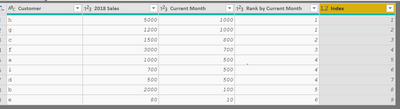
@MNGoodyear In Power Query Editor, just with few clicks based on the sample data provided
1. Sort the CurrentMonth in descending
2. Sort the 2018Sales in descending
3. Add Index column starts with 1
Here is the M-Code for the same
let
Source = Table.FromRows(Json.Document(Binary.Decompress(Binary.FromText("ZY07DsAwCEOvUjFnIKS/u6AMTf/3v0CJUaNKXQx6GFuVFgoUmdnGAO0pB6VimziOfgReuwrcOEMFfGvv35AdLkSYjGCHbcmDJ2gCPqtL3j4M8Msjf/xu/60wPw==", BinaryEncoding.Base64), Compression.Deflate)), let _t = ((type text) meta [Serialized.Text = true]) in type table [Customer = _t, #"2018 Sales" = _t, #"Current Month" = _t, #"Rank by Current Month" = _t]),
#"Changed Type" = Table.TransformColumnTypes(Source,{{"Customer", type text}, {"2018 Sales", Int64.Type}, {"Current Month", Int64.Type}, {"Rank by Current Month", Int64.Type}}),
#"Sorted Rows" = Table.Sort(#"Changed Type",{{"Current Month", Order.Descending}, {"2018 Sales", Order.Descending}}),
#"Added Index" = Table.AddIndexColumn(#"Sorted Rows", "Index", 1, 1)
in
#"Added Index"
Proud to be a PBI Community Champion
you can use this calculated column:
Rank by Current Month, By 2018 Sales = RANKX(Table1, Table1[Current Month]+Table1[2018 Sales]/1000000, ,DESC,Dense)
here is the PBI file
The Power BI Data Visualization World Championships is back! Get ahead of the game and start preparing now!
| User | Count |
|---|---|
| 40 | |
| 36 | |
| 34 | |
| 31 | |
| 27 |
| User | Count |
|---|---|
| 135 | |
| 102 | |
| 67 | |
| 65 | |
| 56 |