cancel
Showing results for 
Search instead for 
Did you mean: 

Data Days is here! Join us now for 60+ days of learning, challenges, and connection. Learn more

Reply
MNGoodyear
Frequent Visitor

Rank using multiple values

I am using rank and have come across a problem.


I want to rank by current month qty, which is fine, however where multiple customers have the same month qty they both get assigned the same rank number, as shown below


I want to rank by current month, and if 2 customers have the same sales qty in a month, then rank by the one with the highest 2018 sales qty , as shown by the example below.


is this possible?


Thanks


Customer2018 SalesCurrent MonthRank by Current Month Rank by Current Month, By 2018 Sales
a10005004 5
b20001005 8
15008002 3
d5005004 7
e80106 9
f30007003 4
g120010001 2
h500010001 1
i7005004 6


1 ACCEPTED SOLUTION
Iamnvt
Continued Contributor

you can use this calculated column:

Rank by Current Month, By 2018 Sales = RANKX(Table1, Table1[Current Month]+Table1[2018 Sales]/1000000, ,DESC,Dense)

here is the PBI file

https://1drv.ms/u/s!Aps8poidQa5zk6pOehW7GfqpkL-PUQ

View solution in original post

2 REPLIES 2
PattemManohar
Community Champion
Community Champion

@MNGoodyear  In Power Query Editor, just with few clicks based on the sample data provided


1. Sort the CurrentMonth in descending

2. Sort the 2018Sales in descending

3. Add Index column starts with 1


Here is the M-Code for the same


let
    Source = Table.FromRows(Json.Document(Binary.Decompress(Binary.FromText("ZY07DsAwCEOvUjFnIKS/u6AMTf/3v0CJUaNKXQx6GFuVFgoUmdnGAO0pB6VimziOfgReuwrcOEMFfGvv35AdLkSYjGCHbcmDJ2gCPqtL3j4M8Msjf/xu/60wPw==", BinaryEncoding.Base64), Compression.Deflate)), let _t = ((type text) meta [Serialized.Text = true]) in type table [Customer = _t, #"2018 Sales" = _t, #"Current Month" = _t, #"Rank by Current Month" = _t]),
    #"Changed Type" = Table.TransformColumnTypes(Source,{{"Customer", type text}, {"2018 Sales", Int64.Type}, {"Current Month", Int64.Type}, {"Rank by Current Month", Int64.Type}}),
    #"Sorted Rows" = Table.Sort(#"Changed Type",{{"Current Month", Order.Descending}, {"2018 Sales", Order.Descending}}),
    #"Added Index" = Table.AddIndexColumn(#"Sorted Rows", "Index", 1, 1)
in
    #"Added Index"
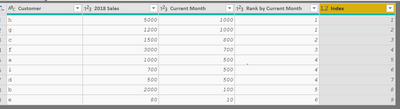
image.png


Did I answer your question? Mark my post as a solution!

Proud to be a PBI Community Champion


Iamnvt
Continued Contributor

you can use this calculated column:

Rank by Current Month, By 2018 Sales = RANKX(Table1, Table1[Current Month]+Table1[2018 Sales]/1000000, ,DESC,Dense)

here is the PBI file

https://1drv.ms/u/s!Aps8poidQa5zk6pOehW7GfqpkL-PUQ

Helpful resources

Announcements
Fabric Data Days is here Carousel

Fabric Data Days 2026

Don't miss out on Data Days, June 15 through August 7. Learn Fabric, Power BI, SQL, AI and more.

May Power BI Update Carousel

Power BI Monthly Update - May 2026

Check out the May 2026 Power BI update to learn about new features.

Power BI DataViz World Championships carousel

Power BI DataViz World Championships - June 2026

A new Power BI DataViz World Championship is coming this June! Don't miss out on submitting your entry.