Join us at FabCon Atlanta from March 16 - 20, 2026, for the ultimate Fabric, Power BI, AI and SQL community-led event. Save $200 with code FABCOMM.
Register now!The Power BI Data Visualization World Championships is back! Get ahead of the game and start preparing now! Learn more
Hi,
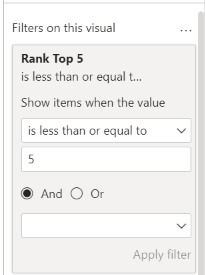
I want to create a top 5 rank for the below data on series. I am able to do this using RANKX and count quantity. Problem is I want to exclued "Not Specified" from my rank calculation to get below desired result. I then want to use this measure as filter on table visual to dynamically select the top 5 each month. When I use this measure
Rank Top 5=RANKX(ALL(Table[Series]),CALCULATE(COUNT(TABLE[Quantity])) it returns Top 5 including not specified and does not work as filter on page. Please help..
Filter not working
Desired Result
| Series | Quantity | Rank |
| Series C | 4 | 1 |
| Series G | 3 | 2 |
| Series B | 2 | 3 |
| Series F | 2 | 4 |
| Series A | 1 | 5 |
Data
| Series | Quantity |
| Series A | 1 |
| Series B | 1 |
| Series C | 1 |
| Series D | 1 |
| Series E | 1 |
| Series F | 1 |
| Series G | 1 |
| Series H | 1 |
| Not Specified | 1 |
| Series C | 1 |
| Series B | 1 |
| Series C | 1 |
| Series C | 1 |
| Series F | 1 |
| Series G | 1 |
| Series G | 1 |
| Not Specified | 1 |
Solved! Go to Solution.
@hemann , Try like
Rank Top 5=RANKX(Filter( ALL(Table[Series]), Table[Series] <> "Not Specified"),CALCULATE(COUNT(TABLE[Quantity]))
or try TOPN
CALCULATE(COUNT(TABLE[Quantity]),TOPN(5,Filter( ALL(Table[Series]), Table[Series] <> "Not Specified"),CALCULATE(COUNT(TABLE[Quantity])) ,DESC),VALUES(Table[Series]))
@hemann , Try like
Rank Top 5=RANKX(Filter( ALL(Table[Series]), Table[Series] <> "Not Specified"),CALCULATE(COUNT(TABLE[Quantity]))
or try TOPN
CALCULATE(COUNT(TABLE[Quantity]),TOPN(5,Filter( ALL(Table[Series]), Table[Series] <> "Not Specified"),CALCULATE(COUNT(TABLE[Quantity])) ,DESC),VALUES(Table[Series]))
The Rank solution for some reason did not work.
The TOPN solution worked, thanks for your help.
Check out the November 2025 Power BI update to learn about new features.
Advance your Data & AI career with 50 days of live learning, contests, hands-on challenges, study groups & certifications and more!