Join us at FabCon Atlanta from March 16 - 20, 2026, for the ultimate Fabric, Power BI, AI and SQL community-led event. Save $200 with code FABCOMM.
Register now!The Power BI Data Visualization World Championships is back! Get ahead of the game and start preparing now! Learn more
Dear all,
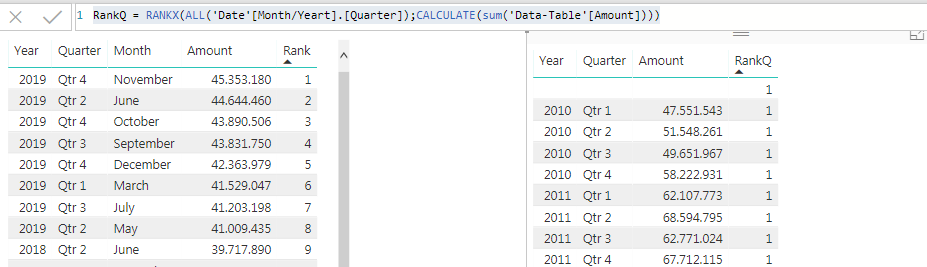
I would like to ask for your help on the below. I would like to rank by months and Quarters. I could do it for the months with the below formula. There are 2 different Tables the one with the amount and the one with the dates. But I have the dates on both tables if that helps(its connected with another table).
Solved! Go to Solution.
Hi @Anonymous,
Please download the demo in the attachment.
1. Create columns for [Year] and [Quarter] in the date table.
2. Create a measure.
ranks 2 = RANKX ( ALL ( 'Date'[Year], 'Date'[Quarter] ), CALCULATE ( SUM ( Table1[Amount] ) ), , , SKIP )
Best Regards,
Dale
Hi @Anonymous,
Please download the demo in the attachment.
1. Create columns for [Year] and [Quarter] in the date table.
2. Create a measure.
ranks 2 = RANKX ( ALL ( 'Date'[Year], 'Date'[Quarter] ), CALCULATE ( SUM ( Table1[Amount] ) ), , , SKIP )
Best Regards,
Dale
It worked!
Thank you very much!!!
The Power BI Data Visualization World Championships is back! Get ahead of the game and start preparing now!
| User | Count |
|---|---|
| 38 | |
| 37 | |
| 33 | |
| 32 | |
| 29 |
| User | Count |
|---|---|
| 132 | |
| 88 | |
| 82 | |
| 68 | |
| 64 |