cancel
Showing results for 
Search instead for 
Did you mean: 

Get Fabric Certified for FREE during Fabric Data Days. Don't miss your chance! Request now

Reply
Anonymous
Not applicable

Rank by Quarters solution

Dear all,


I would like to ask for your help on the below.  I would like to rank by months and Quarters.  I could do it for the months with the below formula. There are 2 different Tables the one with the amount and the one with the dates. But I have the dates on both tables if that helps(its connected with another table).


Rank = RankX(ALLSELECTED('Date'[Month/Yeart]); Calculate(SUM((('data-Table'[Amount])))))
 
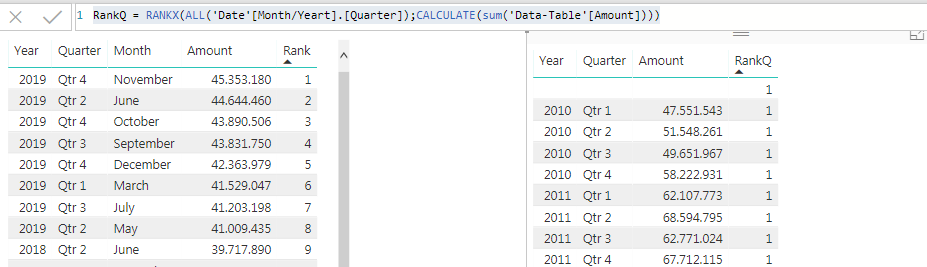
But for the Quarter it does not work! i tried to do that but it appears only 1
 
RankQ = RANKX(ALL('Date'[Month/Yeart].[Quarter]);CALCULATE(sum('Data-Table'[Amount])))
Capture.PNG
 
the data source that I input is like below:
 
Date                        Amount       Type
01/01/2019              45.353.180    Gross Profit
01/02/2019              44.644.460    Gross Profit
01/03/2019              43.890.506    Gross Profit
01/04/2019              43.831.750    Gross Profit
01/05/2019              42.363.979    Gross Profit
01/06/2019              41.529.047    Gross Profit
 
Another solution that I thought is to create it with the below app.
 
Capture (1).PNG
 
But my problem here is that If i put in Thousands it does not appear the dots on the correct spot.
 
Let me know if you have any from the 2 solutions or if you need further info.
 
Thank you in advance.
 
1 ACCEPTED SOLUTION
v-jiascu-msft
Microsoft Employee
Microsoft Employee

Hi @Anonymous,


Please download the demo in the attachment. 

1. Create columns for [Year] and [Quarter] in the date table. 

2. Create a measure.

ranks 2 =
RANKX (
    ALL ( 'Date'[Year], 'Date'[Quarter] ),
    CALCULATE ( SUM ( Table1[Amount] ) ),
    ,
    ,
    SKIP
)
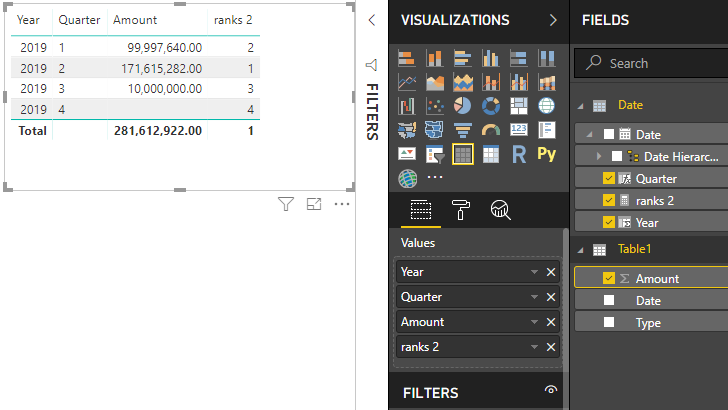
Rank-by-Quarters-solution


Best Regards,
Dale

Community Support Team _ Dale
If this post helps, then please consider Accept it as the solution to help the other members find it more quickly.

View solution in original post

2 REPLIES 2
v-jiascu-msft
Microsoft Employee
Microsoft Employee

Hi @Anonymous,


Please download the demo in the attachment. 

1. Create columns for [Year] and [Quarter] in the date table. 

2. Create a measure.

ranks 2 =
RANKX (
    ALL ( 'Date'[Year], 'Date'[Quarter] ),
    CALCULATE ( SUM ( Table1[Amount] ) ),
    ,
    ,
    SKIP
)

Rank-by-Quarters-solution


Best Regards,
Dale

Community Support Team _ Dale
If this post helps, then please consider Accept it as the solution to help the other members find it more quickly.
Anonymous
Not applicable

It worked! 


Thank you very much!!!

Helpful resources

Announcements
November Power BI Update Carousel

Power BI Monthly Update - November 2025

Check out the November 2025 Power BI update to learn about new features.

Fabric Data Days Carousel

Fabric Data Days

Advance your Data & AI career with 50 days of live learning, contests, hands-on challenges, study groups & certifications and more!

FabCon Atlanta 2026 carousel

FabCon Atlanta 2026

Join us at FabCon Atlanta, March 16-20, for the ultimate Fabric, Power BI, AI and SQL community-led event. Save $200 with code FABCOMM.

Top Solution Authors
Top Kudoed Authors