This is best Fabric, Power BI, SQL and AI community event. How do we know? The last event sold out! Save €200 with code FABCMTY200.
Register nowA new Data Days event is coming soon! This time we’re going bigger than ever. Fabric, Power BI, SQL, AI and more. Don't miss out.
Hello - hoping someone is able to help me out with this, I'm a little out of my depth. I think either a column or DAX would work for me.
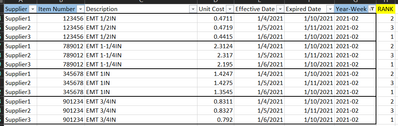
Ultimately I want to rank a vendor's weekly pricing lowest to highest based on part number. Since we can get pricing at different times during the week I created a Year-Week column to base this off of. I added a rank column below of how I would like it to work. I highlighted the columns in blue that I believe are necessary to accomplish this, the rest are just for context.
Thanks in advance!
Solved! Go to Solution.
Hello @hixkim
Create a new calculated column with the following formula:
Sorting Column =
RANKX (
FILTER ( 'Table', 'Table'[Year-Week] = EARLIER ( 'Table'[Year-Week] ) && 'Table'[Item Number] = EARLIER ( 'Table'[Item Number] ) ),
'Table'[Unit Cost],
,
ASC,
DENSE
)
Workspace Attached
Hello @hixkim
Create a new calculated column with the following formula:
Sorting Column =
RANKX (
FILTER ( 'Table', 'Table'[Year-Week] = EARLIER ( 'Table'[Year-Week] ) && 'Table'[Item Number] = EARLIER ( 'Table'[Item Number] ) ),
'Table'[Unit Cost],
,
ASC,
DENSE
)
Workspace Attached
You're amazing. Thank you!!
Hey @hixkim ,
there is a great article about that from SQLBI. Check it out, I think it will solve your issue:
RANKX on multiple columns with DAX and Power BI - SQLBI
Check out the May 2026 Power BI update to learn about new features.
Sign up to receive a private message when registration opens and key events begin.
If you have recently started exploring Fabric, we'd love to hear how it's going. Your feedback can help with product improvements.
| User | Count |
|---|---|
| 31 | |
| 26 | |
| 23 | |
| 22 | |
| 15 |
| User | Count |
|---|---|
| 62 | |
| 47 | |
| 28 | |
| 23 | |
| 19 |