Learn from the best! Meet the four finalists headed to the FINALS of the Power BI Dataviz World Championships! Register now
Hello - hoping someone is able to help me out with this, I'm a little out of my depth. I think either a column or DAX would work for me.
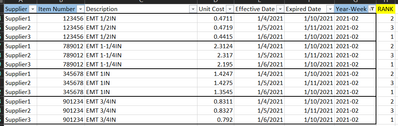
Ultimately I want to rank a vendor's weekly pricing lowest to highest based on part number. Since we can get pricing at different times during the week I created a Year-Week column to base this off of. I added a rank column below of how I would like it to work. I highlighted the columns in blue that I believe are necessary to accomplish this, the rest are just for context.
Thanks in advance!
Solved! Go to Solution.
Hello @hixkim
Create a new calculated column with the following formula:
Sorting Column =
RANKX (
FILTER ( 'Table', 'Table'[Year-Week] = EARLIER ( 'Table'[Year-Week] ) && 'Table'[Item Number] = EARLIER ( 'Table'[Item Number] ) ),
'Table'[Unit Cost],
,
ASC,
DENSE
)
Workspace Attached
Hello @hixkim
Create a new calculated column with the following formula:
Sorting Column =
RANKX (
FILTER ( 'Table', 'Table'[Year-Week] = EARLIER ( 'Table'[Year-Week] ) && 'Table'[Item Number] = EARLIER ( 'Table'[Item Number] ) ),
'Table'[Unit Cost],
,
ASC,
DENSE
)
Workspace Attached
You're amazing. Thank you!!
Hey @hixkim ,
there is a great article about that from SQLBI. Check it out, I think it will solve your issue:
RANKX on multiple columns with DAX and Power BI - SQLBI
| User | Count |
|---|---|
| 51 | |
| 40 | |
| 29 | |
| 19 | |
| 17 |
| User | Count |
|---|---|
| 64 | |
| 57 | |
| 40 | |
| 21 | |
| 19 |