cancel
Showing results for 
Search instead for 
Did you mean: 

Learn from the best! Meet the four finalists headed to the FINALS of the Power BI Dataviz World Championships! Register now

Reply
Anonymous
Not applicable

Rank Values Problem When Equal

Hi All,


I'm facing with rank problem.

I want to give rank to below values. If it is equals it doesn't matter select one of them or sort by Category

I tried this dax but it gives same rank if the values are equal


Measure = RANKX(ALLSELECTED(Table1),CALCULATE(SUM(Table1[Values]),ALLEXCEPT(Table1,Table1[Cat])),,DESC,Dense)


I copied it from anouther post...
https://community.powerbi.com/t5/Desktop/Ranking-a-measure/td-p/539066

I want this output on measure not column...


Category Values

A50
B20
C30
D50
E20
F80


Expected Output
CategoryValuesOutput

A502
B205
C304
D503
E206
F801


Thanks All,

1 ACCEPTED SOLUTION
jdbuchanan71
Super User
Super User

@Anonymous 

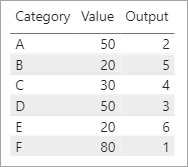
I was able to replicate your desired output with this.

Output = 
VAR _Category = SELECTEDVALUE ( 'DataTable'[Category] )
VAR _Value = SELECTEDVALUE ( 'DataTable'[Value] )
VAR _Rank =
    COUNTROWS ( FILTER ( ALL ( 'DataTable' ), 'DataTable'[Value] > _Value ) ) + 1
VAR _TieBreak =
    COUNTROWS (
        FILTER (
            ALL ( 'DataTable' ),
            'DataTable'[Category] < _Category
                && 'DataTable'[Value] = _Value
        )
    )
RETURN
    _Rank + _TieBreak

jdbuchanan71_0-1604938008578.png


View solution in original post

1 REPLY 1
jdbuchanan71
Super User
Super User

@Anonymous 

I was able to replicate your desired output with this.

Output = 
VAR _Category = SELECTEDVALUE ( 'DataTable'[Category] )
VAR _Value = SELECTEDVALUE ( 'DataTable'[Value] )
VAR _Rank =
    COUNTROWS ( FILTER ( ALL ( 'DataTable' ), 'DataTable'[Value] > _Value ) ) + 1
VAR _TieBreak =
    COUNTROWS (
        FILTER (
            ALL ( 'DataTable' ),
            'DataTable'[Category] < _Category
                && 'DataTable'[Value] = _Value
        )
    )
RETURN
    _Rank + _TieBreak

jdbuchanan71_0-1604938008578.png


Helpful resources

Announcements
Join our Fabric User Panel

Join our Fabric User Panel

Share feedback directly with Fabric product managers, participate in targeted research studies and influence the Fabric roadmap.

February Power BI Update Carousel

Power BI Monthly Update - February 2026

Check out the February 2026 Power BI update to learn about new features.

Users online (2,062)