Join us in Barcelona for FabCon and SQLCon, September 28 - October 1, 2026.
This is best Fabric, Power BI, SQL and AI community event. How do we know? The last event sold out! Save €200 with code FABCMTY200.
Register now- Power BI forums
- Get Help with Power BI
- Desktop
- Service
- Report Server
- Power Query
- Mobile Apps
- Developer
- DAX Commands and Tips
- Custom Visuals Development Discussion
- Health and Life Sciences
- Power BI Spanish forums
- Translated Spanish Desktop
- Training and Consulting
- Instructor Led Training
- Dashboard in a Day for Women, by Women
- Galleries
- Data Stories Gallery
- Themes Gallery
- Contests Gallery
- QuickViz Gallery
- Quick Measures Gallery
- Visual Calculations Gallery
- Fabric Apps Gallery
- Notebook Gallery
- Translytical Task Flow Gallery
- TMDL Gallery
- R Script Showcase
- Webinars and Video Gallery
- Ideas
- Custom Visuals Ideas (read-only)
- Issues
- Issues
- Events
- Upcoming Events
July 28 - August 9 | Final Round of the Power BI Dataviz World Championships. This is your chance. Learn more
- Power BI forums
- Forums
- Get Help with Power BI
- Desktop
- Re: Rank Date
- Subscribe to RSS Feed
- Mark Topic as New
- Mark Topic as Read
- Float this Topic for Current User
- Bookmark
- Subscribe
- Printer Friendly Page


- Mark as New
- Bookmark
- Subscribe
- Mute
- Subscribe to RSS Feed
- Permalink
- Report Inappropriate Content
Rank Date
Hello!
I'm trying to brake my bad habit of adding columns to arrive at a desired outcome, and instead create measures when possible.
I believe this is a fairly simple problem, but I cannot solve it: I simply want a MEASURE to rank the dates in the following table visual (you can access the pbix and data file HERE😞

I simply want to add a MEASURE that 'ranks' these in ascending order. I tried to use both COUNTROWS and RANKX, but could not produce the outcome I'm looking for. In the end, I want the measure to be added to the table visual, and populate a value to the right of each date that ranks each respective date.
I think this logic is what I'm after: I want the measure to iterate through the list, and compare each row to the MIN date in the row, and COUNT that row--adding to the count each time that condition is TRUE.
Thanks for the consideration.
Solved! Go to Solution.


- Mark as New
- Bookmark
- Subscribe
- Mute
- Subscribe to RSS Feed
- Permalink
- Report Inappropriate Content
Hi @ccakjcrx
Try this MEASURE
Index =
RANKX (
    ALLSELECTED ( Sheet1[Month Year] ),
    CALCULATE ( SELECTEDVALUE ( Sheet1[Month Year] ) ),
    ,
    ASC
)
Regards
Zubair
Please try my custom visuals


- Mark as New
- Bookmark
- Subscribe
- Mute
- Subscribe to RSS Feed
- Permalink
- Report Inappropriate Content
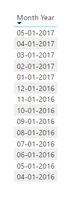
- Mark as New
- Bookmark
- Subscribe
- Mute
- Subscribe to RSS Feed
- Permalink
- Report Inappropriate Content
HEY!
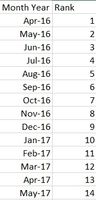
Thanks for responding. I probably should have included this in my original post.
This is the outcome I am looking for:
- Mark as New
- Bookmark
- Subscribe
- Mute
- Subscribe to RSS Feed
- Permalink
- Report Inappropriate Content
Hi @ccakjcrx,
If you column stored the normal date value, you can try to use below measure to calculate the rank as the index:
Index =
COUNTX (
    FILTER ( ALL ( Table ), [Month Year] <= MAX ( [Month Year] ) ),
    [Month Year]
)
Regards,
Xiaoxin Sheng
- Mark as New
- Bookmark
- Subscribe
- Mute
- Subscribe to RSS Feed
- Permalink
- Report Inappropriate Content
@Anonymous
Hey!
Thanks for helping me out.
I applied your measure, but got the 14 for each row--rather than showing 1 for the first row, 2 for the second row, etc. You can download my .pbix file HERE
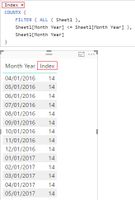
I want to do this in a MEASURE, but I'm not sure it is possible 😞
- Mark as New
- Bookmark
- Subscribe
- Mute
- Subscribe to RSS Feed
- Permalink
- Report Inappropriate Content
Hi @ccakjcrx
Try this MEASURE
Index =
RANKX (
    ALLSELECTED ( Sheet1[Month Year] ),
    CALCULATE ( SELECTEDVALUE ( Sheet1[Month Year] ) ),
    ,
    ASC
)
Regards
Zubair
Please try my custom visuals


- Mark as New
- Bookmark
- Subscribe
- Mute
- Subscribe to RSS Feed
- Permalink
- Report Inappropriate Content
Hi @Zubair_Muhammad ,
I have tried this, but this does gives the desired ranking.
Please refer the image below

Please, let me know your valuable suggestions.
Thank you 🙂
- Mark as New
- Bookmark
- Subscribe
- Mute
- Subscribe to RSS Feed
- Permalink
- Report Inappropriate Content

Helpful resources

FabCon & SQLCon – Barcelona 2026
Join us in Barcelona for FabCon and SQLCon, the Fabric, Power BI, SQL, and AI community event. Save €200 with code FABCMTY200.

Power BI Monthly Update - July 2026
Check out the July 2026 Power BI update to learn about new features.

Power BI DataViz World Championships - June 2026
A new Power BI DataViz World Championship is coming this June! Don't miss out on submitting your entry.

| User | Count |
|---|---|
| 25 | |
| 23 | |
| 20 | |
| 18 | |
| 14 |


| User | Count |
|---|---|
| 22 | |
| 20 | |
| 20 | |
| 20 | |
| 20 |


