We've captured the moments from FabCon & SQLCon that everyone is talking about, and we are bringing them to the community, live and on-demand. Starts on April 14th. Register now
Hi
Could you please help me to figure out this, I need to select randomly 2 order number from each category. How I can do this in power BI?
| Category | Order Number |
| Category A | 1131292 |
| Category A | 1131240 |
| Category A | 1131285 |
| Category A | 1131278 |
| Category A | 1131287 |
| Category B | 1131256 |
| Category B | 1131262 |
| Category B | 1131259 |
| Category B | 1131238 |
| Category C | 1131260 |
| Category C | 1131245 |
| Category C | 1131244 |
| Category C | 1131281 |
| Category C | 1131240 |
| Category C | 1131294 |
| Category C | 1131273 |
Solved! Go to Solution.
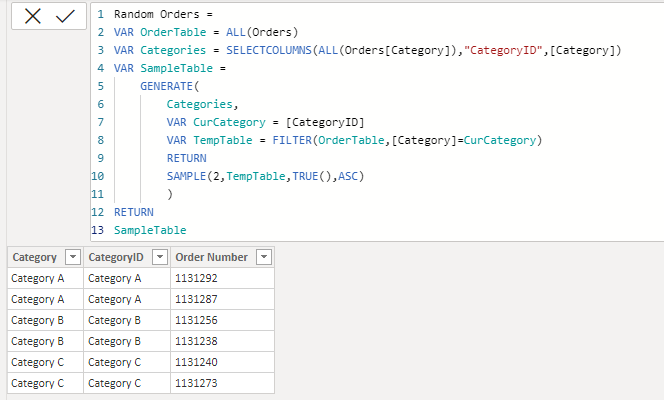
I don't really know why those 2 specific orders are shown... I just used the standard function SAMPLE(). Please go through the following link and you can further parametrize the function.
https://docs.microsoft.com/en-us/dax/sample-function-dax
If this solution does not meet your requirements, then you will have to consider ranking the orders using RANKX() and then use RANDBETWEEN() to generate a random number between the lowest and highest rank of each category and then pick any two randomly for each category, then do a cross join or use GENERATE in that context.
Assume that you have the following table named "Orders"
The following calculated table expression gives you the sample table.
I don't really know why those 2 specific orders are shown... I just used the standard function SAMPLE(). Please go through the following link and you can further parametrize the function.
https://docs.microsoft.com/en-us/dax/sample-function-dax
If this solution does not meet your requirements, then you will have to consider ranking the orders using RANKX() and then use RANDBETWEEN() to generate a random number between the lowest and highest rank of each category and then pick any two randomly for each category, then do a cross join or use GENERATE in that context.
Thank you so much for your time @Anonymous, Yes that becomes deterministic value. I did the same as you suggested added RAND() column and created a table as follows
If you have recently started exploring Fabric, we'd love to hear how it's going. Your feedback can help with product improvements.
A new Power BI DataViz World Championship is coming this June! Don't miss out on submitting your entry.
Share feedback directly with Fabric product managers, participate in targeted research studies and influence the Fabric roadmap.
| User | Count |
|---|---|
| 53 | |
| 38 | |
| 33 | |
| 15 | |
| 15 |
| User | Count |
|---|---|
| 64 | |
| 63 | |
| 37 | |
| 36 | |
| 22 |