Join us at FabCon Atlanta from March 16 - 20, 2026, for the ultimate Fabric, Power BI, AI and SQL community-led event. Save $200 with code FABCOMM.
Register now!The Power BI Data Visualization World Championships is back! It's time to submit your entry. Live now!
Hello,
I have a metric that I would like to show on a radial gauge, but there is no target, min or max value.
Here is the scenario
I have a population of closed cases which have a due date.
A calculated column tells me whether the case was closed "On Time" or "Delayed"
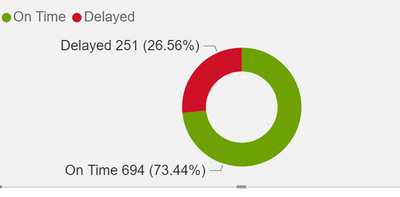
I would like the gauge to simply show the percentage of On Time cases in green, and percentage of Delayed cases in red.
If it were a donut, it would look like this...
Does anybody know of a clever way around this? Any help would be appreciated.
Solved! Go to Solution.
@Carrhill , Gauge will be able to show only one %,
Half donut , might be better choice, check if this custom visual have something
https://xviz.com/blogs/xviz-adv-pie-and-donut-for-power-bi/
@Carrhill , Gauge will be able to show only one %,
Half donut , might be better choice, check if this custom visual have something
The Power BI Data Visualization World Championships is back! It's time to submit your entry.
Check out the January 2026 Power BI update to learn about new features.
| User | Count |
|---|---|
| 56 | |
| 41 | |
| 39 | |
| 22 | |
| 21 |
| User | Count |
|---|---|
| 144 | |
| 106 | |
| 63 | |
| 38 | |
| 31 |