cancel
Showing results for 
Search instead for 
Did you mean: 

The Power BI Data Visualization World Championships is back! Get ahead of the game and start preparing now! Learn more

Reply
carlosagarcia
Helper I
Helper I

ROUNDDOWN TIME

Hello guys,

I am looking at using the ROUNDDOWN function.

I want to ROUNDDOWN time in all transactions made in a specific hours throughout the day. Say there were 15 transactions between 9 am and 10 am.. 9:01:02am, 9:10:05am, 9:12:52am etc.. All rounddown to 9:00:00am or 9:00am so I can measure day by the hour.


I have tried

= ROUNDDOWN(Query[TIME], 1) which messes up the result


= ROUNDDOWN(Query[TIME], "1:00") which gives me an error, cannot convert value


The time is in H:mm:ss

2 ACCEPTED SOLUTIONS
Anonymous
Not applicable

Hi @carlosagarcia 


Try this


=MROUND( [Time], 1/8 )

View solution in original post

v-juanli-msft
Community Support
Community Support

Hi @carlosagarcia 

You could find more explaination and examples about the "round up" for time below.

https://community.powerbi.com/t5/Desktop/Round-time-DOWN-to-the-nearest-5-15-30-minutes/td-p/311676

https://community.powerbi.com/t5/Desktop/Round-up-time-to-next-hour/td-p/701404

https://community.powerbi.com/t5/Desktop/How-to-round-minutes-in-time-to-the-nearest-hour/td-p/47643...


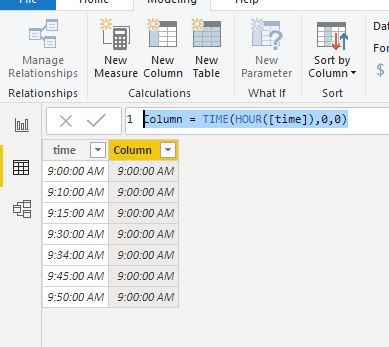
But, in your scenario, you could take a easy way as below:

Column = TIME(HOUR([time]),0,0)
Capture2.JPG
Best Regards
Maggie
Community Support Team _ Maggie Li
If this post helps, then please consider Accept it as the solution to help the other members find it more quickly.

View solution in original post

4 REPLIES 4
v-juanli-msft
Community Support
Community Support

Hi @carlosagarcia 

You could find more explaination and examples about the "round up" for time below.

https://community.powerbi.com/t5/Desktop/Round-time-DOWN-to-the-nearest-5-15-30-minutes/td-p/311676

https://community.powerbi.com/t5/Desktop/Round-up-time-to-next-hour/td-p/701404

https://community.powerbi.com/t5/Desktop/How-to-round-minutes-in-time-to-the-nearest-hour/td-p/47643...


But, in your scenario, you could take a easy way as below:

Column = TIME(HOUR([time]),0,0)
Capture2.JPG
Best Regards
Maggie
Community Support Team _ Maggie Li
If this post helps, then please consider Accept it as the solution to help the other members find it more quickly.
Anonymous
Not applicable

Try creating a new column with the following measure


=MROUND( [Time], "0:15" ) 


But make sure that the new column data type is Time.

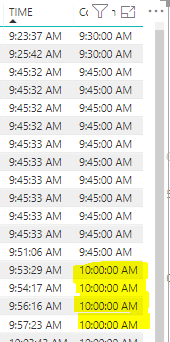
Capture2.PNG


It partially works but anything done after 9:45AM rounds up to 10AM.

Anonymous
Not applicable

Hi @carlosagarcia 


Try this


=MROUND( [Time], 1/8 )

Helpful resources

Announcements
Power BI DataViz World Championships

Power BI Dataviz World Championships

The Power BI Data Visualization World Championships is back! Get ahead of the game and start preparing now!

December 2025 Power BI Update Carousel

Power BI Monthly Update - December 2025

Check out the December 2025 Power BI Holiday Recap!

FabCon Atlanta 2026 carousel

FabCon Atlanta 2026

Join us at FabCon Atlanta, March 16-20, for the ultimate Fabric, Power BI, AI and SQL community-led event. Save $200 with code FABCOMM.