Join us at FabCon Atlanta from March 16 - 20, 2026, for the ultimate Fabric, Power BI, AI and SQL community-led event. Save $200 with code FABCOMM.
Register now!The Power BI Data Visualization World Championships is back! It's time to submit your entry. Live now!
Hello guys,
I am looking at using the ROUNDDOWN function.
I want to ROUNDDOWN time in all transactions made in a specific hours throughout the day. Say there were 15 transactions between 9 am and 10 am.. 9:01:02am, 9:10:05am, 9:12:52am etc.. All rounddown to 9:00:00am or 9:00am so I can measure day by the hour.
I have tried
= ROUNDDOWN(Query[TIME], 1) which messes up the result
= ROUNDDOWN(Query[TIME], "1:00") which gives me an error, cannot convert value
The time is in H:mm:ss
Solved! Go to Solution.
You could find more explaination and examples about the "round up" for time below.
https://community.powerbi.com/t5/Desktop/Round-time-DOWN-to-the-nearest-5-15-30-minutes/td-p/311676
https://community.powerbi.com/t5/Desktop/Round-up-time-to-next-hour/td-p/701404
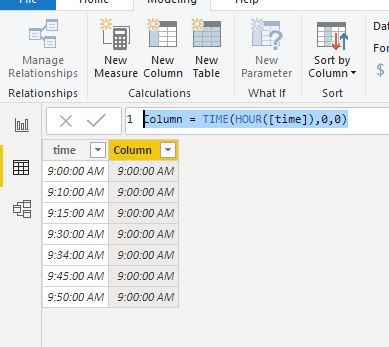
But, in your scenario, you could take a easy way as below:
You could find more explaination and examples about the "round up" for time below.
https://community.powerbi.com/t5/Desktop/Round-time-DOWN-to-the-nearest-5-15-30-minutes/td-p/311676
https://community.powerbi.com/t5/Desktop/Round-up-time-to-next-hour/td-p/701404
But, in your scenario, you could take a easy way as below:
Try creating a new column with the following measure
=MROUND( [Time], "0:15" )
But make sure that the new column data type is Time.
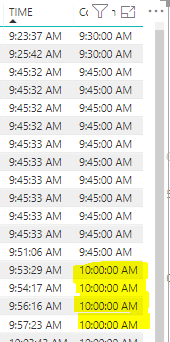
It partially works but anything done after 9:45AM rounds up to 10AM.
| User | Count |
|---|---|
| 49 | |
| 37 | |
| 33 | |
| 22 | |
| 18 |
| User | Count |
|---|---|
| 132 | |
| 100 | |
| 56 | |
| 37 | |
| 37 |