Learn from the best! Meet the four finalists headed to the FINALS of the Power BI Dataviz World Championships! Register now
Hello guys,
I am looking at using the ROUNDDOWN function.
I want to ROUNDDOWN time in all transactions made in a specific hours throughout the day. Say there were 15 transactions between 9 am and 10 am.. 9:01:02am, 9:10:05am, 9:12:52am etc.. All rounddown to 9:00:00am or 9:00am so I can measure day by the hour.
I have tried
= ROUNDDOWN(Query[TIME], 1) which messes up the result
= ROUNDDOWN(Query[TIME], "1:00") which gives me an error, cannot convert value
The time is in H:mm:ss
Solved! Go to Solution.
You could find more explaination and examples about the "round up" for time below.
https://community.powerbi.com/t5/Desktop/Round-time-DOWN-to-the-nearest-5-15-30-minutes/td-p/311676
https://community.powerbi.com/t5/Desktop/Round-up-time-to-next-hour/td-p/701404
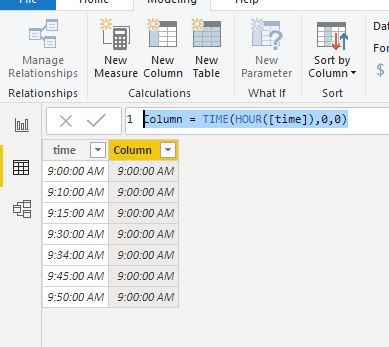
But, in your scenario, you could take a easy way as below:
You could find more explaination and examples about the "round up" for time below.
https://community.powerbi.com/t5/Desktop/Round-time-DOWN-to-the-nearest-5-15-30-minutes/td-p/311676
https://community.powerbi.com/t5/Desktop/Round-up-time-to-next-hour/td-p/701404
But, in your scenario, you could take a easy way as below:
Try creating a new column with the following measure
=MROUND( [Time], "0:15" )
But make sure that the new column data type is Time.
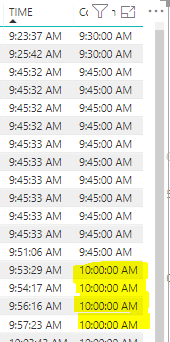
It partially works but anything done after 9:45AM rounds up to 10AM.
A new Power BI DataViz World Championship is coming this June! Don't miss out on submitting your entry.
Share feedback directly with Fabric product managers, participate in targeted research studies and influence the Fabric roadmap.
| User | Count |
|---|---|
| 45 | |
| 35 | |
| 30 | |
| 15 | |
| 15 |
| User | Count |
|---|---|
| 58 | |
| 55 | |
| 38 | |
| 21 | |
| 21 |