cancel
Showing results for 
Search instead for 
Did you mean: 

View all the Fabric Data Days sessions on demand. View schedule

Reply
Krogne
Frequent Visitor

RLS removes authorized rows from resulting dataset (truncates)

Hello,


We have observed a strange behavior that causes data to be truncated in the visualisations. When viewed as a role with filter on a table with a one-to-many relation to a different table, and the table has invalid keys, the rows are removed completely.

Scenario:


Every table that should have RLS, has a column with account ids.

The actual key for the table is a combined key from the account id, and what would be the key without RLS.

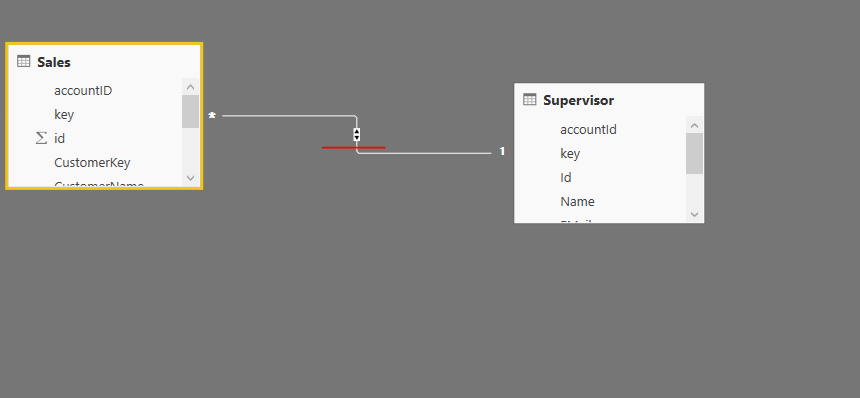
the tables has the following relations

Relations


When a role with no filter is applied this is the result:


When a role that filters on table[accountId] = "asdf" is enabled, this is the result:

As expected.


Now a role with filter table[accountId] = "qwer" enabled:


Data rows from the sales table are missing. 


Is this expected behaviour in such a scenario?


Are there ways to make it behave as expected when the data is arranged this way? (Besides adding "void" rows to every single table)

1 ACCEPTED SOLUTION
Anonymous
Not applicable

@Krogne,

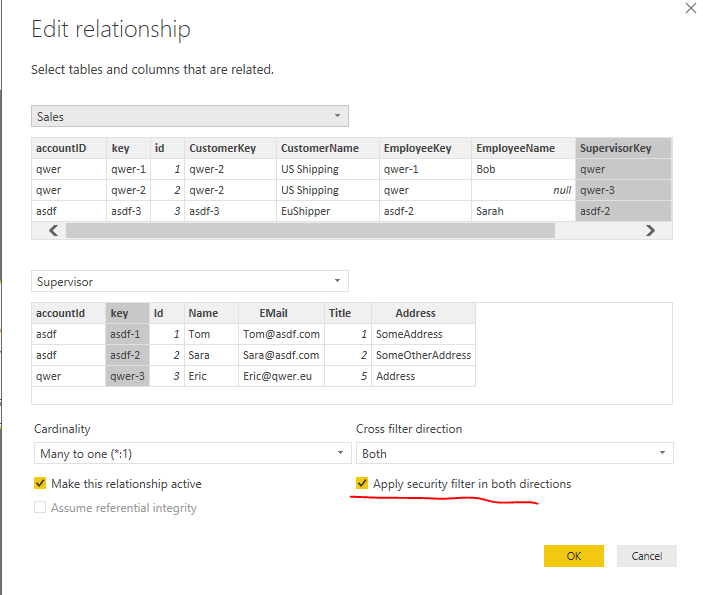
Create relationship between sales table and supervisor table as shown in the following screenshots. Create same role as described in attached PBIX file.

1.PNG2.PNG

Regards,
Lydia

View solution in original post

3 REPLIES 3
Anonymous
Not applicable

@Krogne,

Create relationship between sales table and supervisor table as shown in the following screenshots. Create same role as described in attached PBIX file.

1.PNG2.PNG

Regards,
Lydia

Anonymous
Not applicable

@Krogne,

What fields of there tables (Employee Table, Supervsor Table, Sales Table) do you use to create relationship?

If you use key field of Employee Table and EmployeeKey field of Sales Table to create one to many rleationship, I note that the Employee Table doesn't contain qwer value. Same scenario occurs in Supervisor table if you use key field of Supervisor and SupervisorKey of Sales Table to create relationship.

In addition, do you create the role filter in Employee table? Could you please copy the data of the above tables in Excel file and share me the Excel file so that I can copy and paste data.

Regards,
Lydia

@Anonymous

The relations are between:

Sales[EmployeeKey] <> Employee[key]

Sales[SupervisorKey] <> Supervisor[key].


Excel: Excel data


Role filter is applied on both Employee and Supervisor tables.


-Krogne

Helpful resources

Announcements
November Power BI Update Carousel

Power BI Monthly Update - November 2025

Check out the November 2025 Power BI update to learn about new features.

Fabric Data Days Carousel

Fabric Data Days

Advance your Data & AI career with 50 days of live learning, contests, hands-on challenges, study groups & certifications and more!

FabCon Atlanta 2026 carousel

FabCon Atlanta 2026

Join us at FabCon Atlanta, March 16-20, for the ultimate Fabric, Power BI, AI and SQL community-led event. Save $200 with code FABCOMM.

Top Solution Authors
Top Kudoed Authors